
What Is an Agentic Browser?
An agentic browser is a browser environment that lets an AI agent observe web pages and take actions such as navigating, filling forms, clicking controls, downloading files, or extracting results. The defining feature is an action loop: page state informs the next action, and the action changes what the agent sees next.
By Agent Guard Team3 min read
What Is an Agentic Browser?
An agentic browser is a browser environment that lets an AI agent observe web pages and take actions such as navigating, filling forms, clicking controls, downloading files, or extracting results. The defining feature is an action loop: page state informs the next action, and the action changes what the agent sees next. The Palo Alto Networks agentic-browser explainer is a direct source for the term, capabilities, and identity boundary.
The browser is an execution surface
When an agent reads a website, the main risk may be inaccurate information. When it can submit a form, update an account, purchase a service, or copy data from an authenticated session, the browser becomes an execution surface. The safety question shifts from “did the model generate good text?” to “which actions can this session perform, for which targets, and with whose identity?”
An agentic browser therefore needs a narrower permission model than ordinary web browsing. A public status-page lookup and a payroll change are not comparable actions simply because both use a click.
What the action loop contains
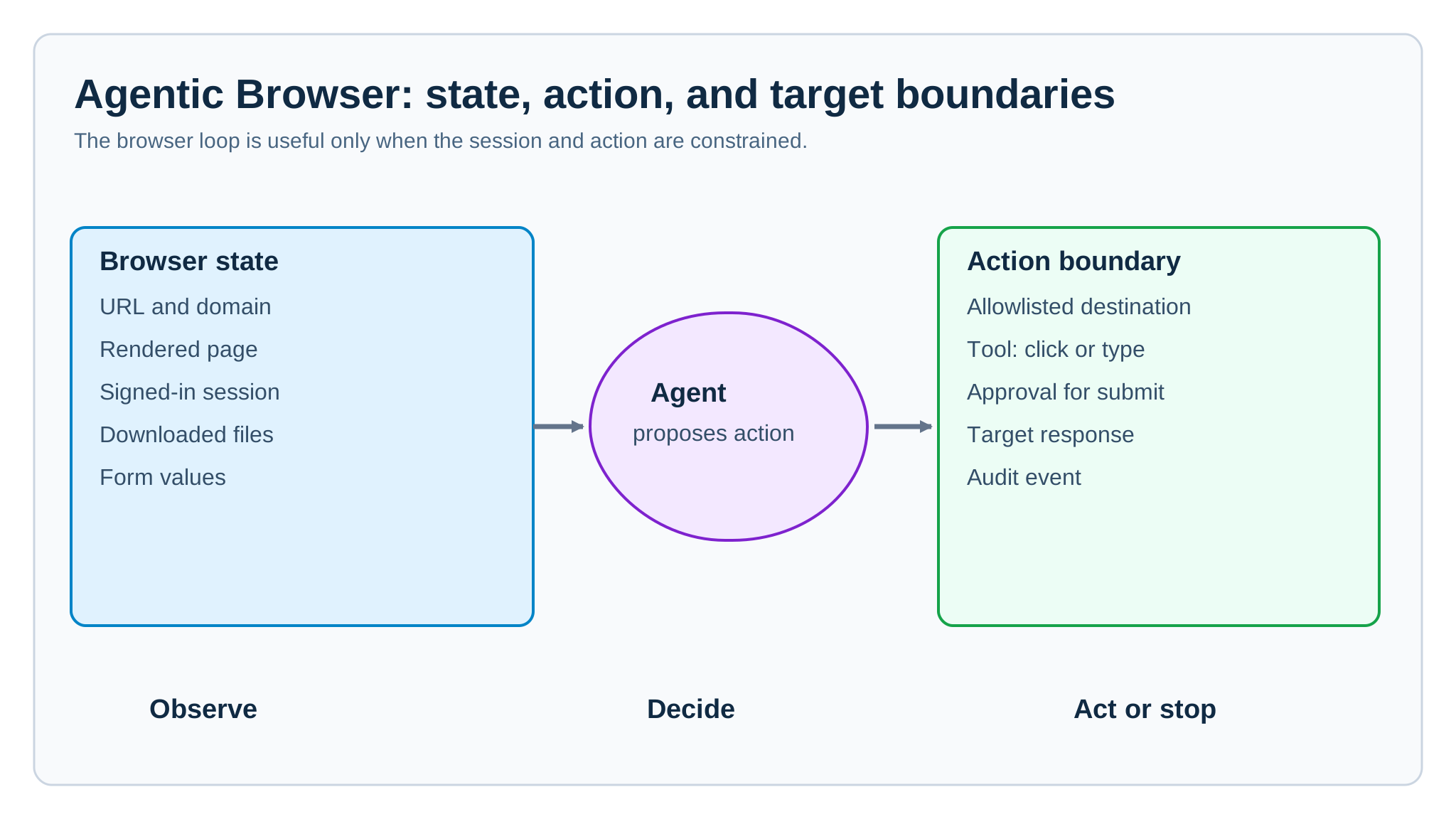
Most implementations provide a model with a representation of browser state, a set of actions, and feedback after each action. State may include a DOM snapshot, accessibility tree, screenshot, URL, download list, or form values. Actions may include navigation, click, type, upload, download, scroll, and confirmation. The harness decides how many iterations the agent may take and when it must stop.
The technical loop is not sufficient authorization. A policy should constrain domains, session identities, sensitive fields, file transfers, and consequential submits. The AI agent security controls guide is relevant to locating those checks around the model, browser tool, and target application.
A safe operational example
An accounts-payable assistant can open a vendor portal, read an invoice status, prepare a payment request, and stop before the final submit. It should not silently reuse a privileged browser session to approve the payment. The final action needs a clear user or service identity, a policy decision, and a record of whether the target changed.
This pattern retains the convenience of browser automation while separating observation from commitment. It also gives a reviewer a meaningful test: the agent may reach the review page, but an unapproved or out-of-scope payment should not be submitted.
Agentic browser, crawler, and RPA
A crawler collects or indexes pages, usually without acting as a signed-in user. Traditional RPA follows predefined scripts and selectors. An agentic browser can choose a next step from changing page state, making it more adaptable when layouts or tasks vary. That adaptability also means a prompt, web page, or tool result can influence a path that was not fully scripted.
This is why indirect instructions matter. A page, attachment, or retrieved record may contain text intended to steer the agent away from its task. The prompt injection glossary explains the input problem; browser controls must still limit what an influenced agent can do with the session it holds.
Controls that matter most
Use dedicated short-lived sessions, allowlisted destinations, constrained action tools, and explicit approval for irreversible or high-value transactions. Avoid putting passwords, long-lived tokens, or unrestricted personal sessions into model-visible context. Log the proposed action, relevant arguments, policy result, confirmation state, and final response from the website.
If the browser uses connected protocol tools, review the server and permissions separately. The MCP security tools review can help frame that component review, but it does not replace browser-specific controls such as session isolation and transaction confirmation.
When it is appropriate
Use an agentic browser for bounded tasks where the value of adaptive navigation outweighs the risk of a broad session. Start with read-only tasks, then add low-impact actions with visible approvals. Do not treat “browser access” as one permission; treat it as a set of specific capabilities tied to identities, domains, and effects.
The OWASP Agentic AI Top 10 provides broader context for capability, oversight, and risk decisions.
Frequently Asked Questions
How is an agentic browser different from a crawler or RPA?
A crawler mainly collects pages, while traditional RPA follows predefined steps. An agentic browser chooses its next action from changing page state, so it can adapt to a task but may also follow an unsafe path that was not fully scripted.
Why are authenticated browser sessions risky for AI agents?
The session may expose private data and authority to update accounts, submit forms, download files, or make transactions. Session isolation and action constraints are needed because seeing a page should not imply permission to use every available control.
Which browser actions should require human approval?
Require approval before irreversible, high-value, externally binding, or sensitive-data actions, such as submitting a payment, changing access, sending a message, or transferring a protected file.
Test browser actions against the controls that should stop an unsafe transaction.
Test actions