
What Is Model Context Protocol?
Learn how MCP hosts, clients, servers, capabilities, transports, and downstream systems work, including the security responsibilities MCP leaves open.
By Agent Guard Team10 min read
What Is Model Context Protocol?
Model Context Protocol (MCP) is an open protocol that standardizes how AI applications discover and use external capabilities and context. It gives hosts, clients, and servers a shared way to negotiate features and exchange tool, resource, and prompt messages without defining the business permissions behind those capabilities.
What Is the Model Context Protocol?
MCP is an application-layer protocol for connecting AI applications to external systems. An AI host can use MCP clients to communicate with servers that expose tools, resources, or prompt templates. The protocol defines message shapes, capability negotiation, lifecycle behavior, and transports so each integration does not need a completely custom connector.
The official MCP introduction describes a client-server architecture through which AI applications connect to data sources, tools, and workflows. MCP does not provide the model itself, store all enterprise data, or decide whether an action is safe. It structures communication between components that retain their own responsibilities.
The acronym is ambiguous outside AI. In this article, MCP always means Model Context Protocol.
Why MCP Was Created
Without a shared protocol, an AI application and an external service usually need a dedicated integration. The application must learn the service's discovery rules, authentication flow, request schema, response format, error behavior, and lifecycle. The same work repeats for every host and service pair.
MCP creates a reusable interface. A server can describe capabilities in a standard form, and a compatible host can connect through a client. This changes integration from a matrix of point-to-point adapters toward a protocol ecosystem.
The protocol does not remove service-specific work. A calendar server still needs calendar semantics, credentials, and downstream API logic. A host still needs user consent, policy, user experience, and safe execution. MCP standardizes the exchange between them.
This separation supports composability. A host can connect multiple servers, and a server can serve multiple compatible hosts. Teams can replace or upgrade components with less integration churn when each side follows the same negotiated contract.
How MCP Architecture Works
The official MCP architecture documentation separates the system into host, client, and server roles.
Host
The host is the AI application the user interacts with, such as a coding environment, assistant, or agent platform. It owns the user experience, model access, permissions, consent flow, orchestration, and isolation between connections. A host may create one client for each server connection.
Client
The client is the protocol component inside the host that maintains a connection to one server. It initializes the session, negotiates capabilities, sends requests, receives results and notifications, and manages protocol lifecycle for that connection.
The client should not be treated as an independent authority. It acts within the host's security and product decisions.
Server
The server exposes a focused set of capabilities. It may wrap a local filesystem, development tool, database, SaaS service, knowledge source, or business workflow. The server translates MCP messages into operations against its own code or downstream systems.
A server can be local or remote. Its location affects transport, authentication, data flow, deployment, and trust, but its role in the protocol remains the same.
Transport and downstream systems
MCP messages travel over a supported transport. The transport carries protocol traffic; it does not replace application authorization. Behind the server, a downstream API, database, filesystem, or command may apply the final side effect under a particular identity.
The complete path is user and model, host, client, transport, server, downstream system, result, and the host's next decision. Security and debugging both require visibility across that path.
What MCP Servers Can Expose
Tools
Tools are callable operations. A tool definition includes a name, description, and input schema so the host can present or invoke it. Examples include creating an issue, running a query, reading a file, or calling a business workflow.
The schema improves interoperability and validation. It does not prove that the implementation is trustworthy or that the caller has permission for every valid argument.
Resources
Resources expose context that an application can read, such as files, database records, documentation, or application state. Servers can describe resource identifiers and content types. The host decides when and how to include that content in the model's context.
Prompts
Prompts are server-provided templates or workflows that users or hosts can select. They can package recurring instructions and expected arguments. Because their content can influence model behavior, hosts should preserve provenance and treat server-supplied prompts as external input.
Capability discovery
During initialization, participants declare protocol versions and supported features. A host can then discover the tools, resources, and prompts a server offers. Discovery lets the interface adapt to available capabilities instead of hard-coding every operation.
Capabilities can change after a server update or configuration change. Inventory and approval processes should retain the discovered version and compare changes before wider trust is granted.
What Happens During an MCP Request
A typical connection and tool request follows this sequence:
1. The host starts or reaches the server and creates a client connection. 2. Client and server initialize, agree on a protocol version, and declare capabilities. 3. The client requests available tools, resources, or prompts as needed. 4. The server returns definitions, schemas, and metadata. 5. The user, host, or model selects a capability within the host's product flow. 6. The host validates the request and applies consent, authorization, and policy. 7. The client sends the invocation to the server. 8. The server validates inputs, checks its own authorization, and calls the downstream system. 9. The result returns through the server and client to the host. 10. The host validates the result and decides whether to show it, store it, or allow another action.
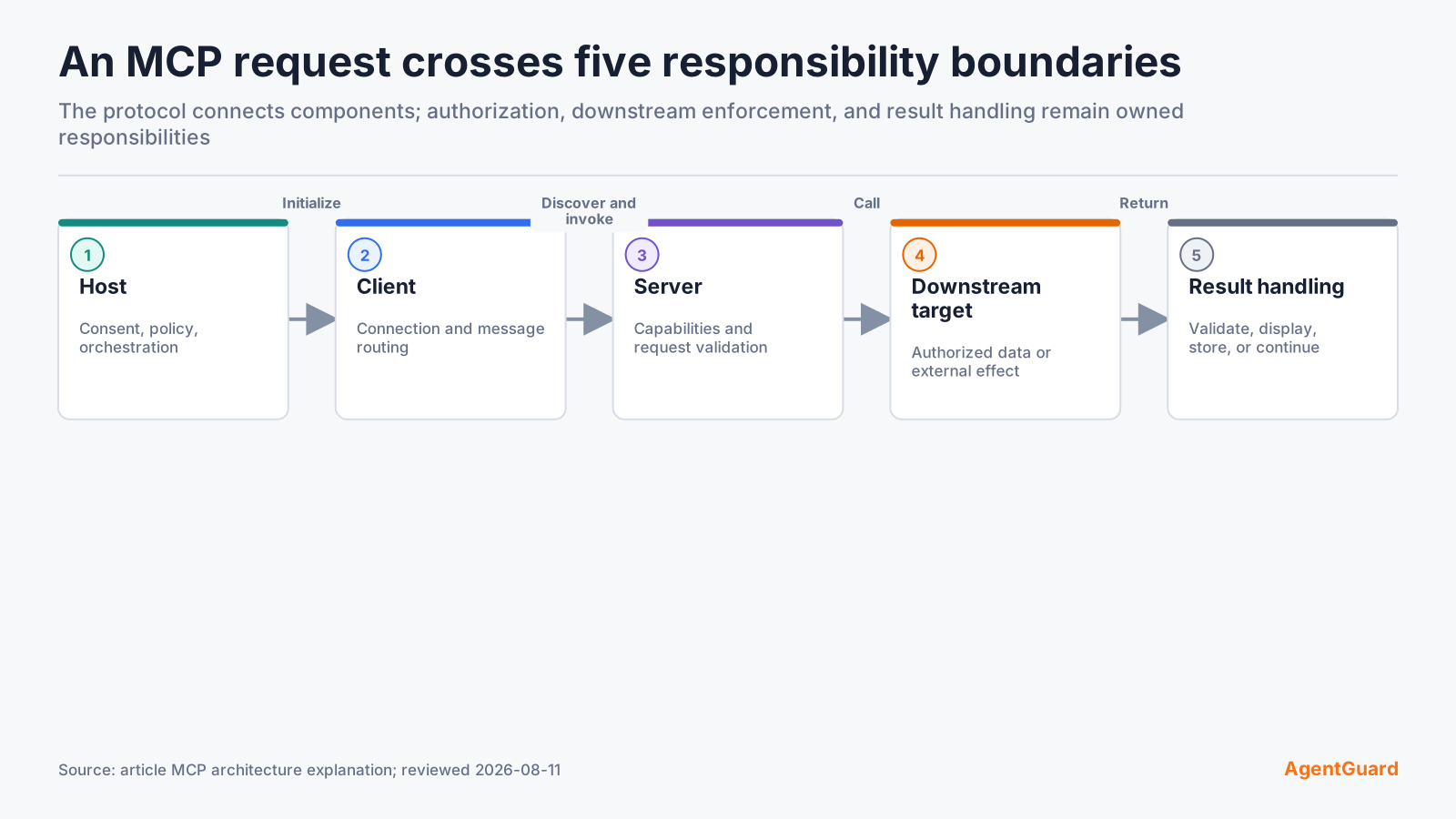
Initialization and discovery are part of the security context. A host should know which server and capability version produced an action. Invocation is only one moment in the lifecycle.
Errors also travel through the protocol. The host should distinguish a policy denial, invalid arguments, transport failure, server error, downstream rejection, and timeout. Retrying an ambiguous request can duplicate side effects.
MCP vs APIs, Function Calling, and RAG
MCP vs API
An API defines how software interacts with a service. MCP can sit above or beside APIs: an MCP server may translate standard protocol requests into a vendor-specific API. APIs remain responsible for service semantics, identities, authorization, limits, and downstream behavior.
MCP vs function calling
Function calling is a model or platform mechanism for producing structured calls. MCP defines how an application discovers and communicates with external capability providers. A host can use model function calling to choose an MCP tool, then use MCP to send the invocation.
MCP vs RAG
Retrieval-augmented generation fetches relevant information and adds it to model context. An MCP resource or tool can provide retrieval, but MCP also supports actions and reusable prompts. RAG is a context pattern; MCP is a connection protocol that can carry several capability types.
| Concept | Primary job | Can compose with MCP? |
|---|---|---|
| API | Expose service operations or data | Yes, often behind a server |
| Function calling | Produce structured model-selected calls | Yes, inside the host |
| RAG | Retrieve context for generation | Yes, through resources or tools |
| Agent framework | Orchestrate models, state, and actions | Yes, as an MCP host or consumer |
Common MCP Use Cases
Developer tools
A coding host can connect to source control, issue tracking, build systems, documentation, databases, or local development utilities. Each server can expose a focused capability set while the host coordinates the task.
Enterprise data
Servers can provide controlled access to knowledge bases, analytics systems, customer records, or internal services. The organization still needs identity, row or object-level authorization, data classification, and audit at the downstream system.
SaaS workflows
An assistant can draft or perform actions in ticketing, CRM, messaging, calendar, and productivity services. Consequential operations should preserve user consent, exact targets, and final-state verification.
Local resources
Local servers can expose files, processes, tools, and application state without publishing them as an internet service. Locality reduces some network exposure but does not make the component or its permissions trustworthy by default.
What MCP Does Not Solve by Itself
MCP compatibility does not establish server trust. Teams must decide which server implementation, publisher, version, and configuration may enter the environment. They also need a review path for changed tools, descriptions, schemas, dependencies, and prompts.
The protocol does not grant least privilege automatically. Hosts and servers must authenticate identities, authorize resources and actions, constrain credentials, validate arguments, and preserve downstream permissions. A schema-valid request can still target the wrong account, file, domain, or record.
MCP does not make tool results safe. Results can contain sensitive data, misleading instructions, malformed content, or untrusted links. The host should validate and label results before placing them into model context or allowing a follow-up action.
Detailed MCP security controls and trust boundaries belong in a dedicated MCP security assessment. At minimum, inventory the connection, review the component, scope identity, validate calls and results, enforce high-impact actions, and retain evidence.
Where AgentGuard Fits
AgentGuard publicly documents two relevant boundaries. Deep Scan covers named component types including skills, tools, plugins, MCP servers, and agent code. Runtime Guard evaluates selected action categories before execution when the host integration exposes the action.
These checks answer different questions. Component review asks whether an implementation should enter a trusted environment. Action evaluation asks whether this proposed effect should execute now under the current policy and context. Neither replaces server authentication, downstream authorization, safe host design, or result validation.
AgentGuard's public FAQ also sets an important limit: it does not claim to fully monitor or block all runtime calls from every third-party MCP server. Verify host and adapter coverage for each workflow.
The AgentGuard documentation can help a team inspect the current product setup and API surfaces before designing that test. Start with one server, record its source and discovered capabilities, and choose a harmless tool call whose downstream state is easy to verify.
Keep the product roles explicit during evaluation. A scan result can support the decision to admit or reject a server version. A runtime decision can allow, pause, or deny a proposed action on an instrumented path. The server and downstream service still need authentication, least privilege, input validation, safe error handling, and target-side audit.
When the server changes, repeat both checks. Compare its tool schemas, descriptions, prompts, resources, dependencies, destinations, and permission needs. Then rerun the relevant allowed and risky actions. This closes the gap between a component that looked acceptable at installation and a workflow whose behavior changed later.
For the next step, separate protocol learning from MCP security controls and trust boundaries. The protocol explains how capabilities are negotiated and invoked. An AI agent security guide explains how that connection fits with identity, data, components, runtime actions, downstream permissions, evidence, and incident response. Keeping those scopes distinct makes architecture reviews shorter and control ownership clearer.
Maintain an MCP connection inventory with host, server, version, transport, owner, discovered capabilities, identity, downstream systems, approved data, review date, and change history. This turns protocol composition into an operable system record and gives incident responders a starting point when a server or tool changes unexpectedly.
Inspect an MCP Workflow by connecting one non-production server and testing both its component evidence and a harmless high-impact action.
Frequently Asked Questions
What does MCP stand for in AI?
MCP stands for Model Context Protocol, an open protocol for connecting AI applications with external tools, resources, and prompt templates.
Is MCP the same as an API?
No. An MCP server may wrap an API, but MCP adds a common protocol for capability discovery, lifecycle, and exchange between AI hosts and servers.
Is MCP only for Claude?
No. MCP is an open protocol. Compatible hosts and servers can implement it regardless of the model provider.
What is an MCP server?
An MCP server is a program that exposes focused tools, resources, or prompts to an AI host through the protocol, often backed by local code or a downstream service.
Is Model Context Protocol secure?
MCP provides protocol structure. Secure use still depends on trusted components, authentication, authorization, least privilege, argument and result validation, action control, and audit.
Inspect one MCP connection before connecting it to a production agent.
Scan MCP Connections