
Browser Agent Security: Risks, Controls, and Testing
Secure browser agents against prompt injection, unsafe navigation, credential exposure, consequential actions, and unverifiable outcomes.
By Agent Guard Team12 min read
Browser Agent Security: Risks, Controls, and Testing
A browser agent can interpret untrusted page content while holding an authenticated session and the ability to click, type, upload, download, purchase, or submit. Secure operation requires controls around the browser's identity, navigation, data, consequential actions, result verification, and emergency stop path.
Define the Browser-Agent Trust Boundary
A browser agent combines several systems with different trust levels: a model plans the task; a host provides tools; a browser renders pages and holds state; websites supply content and scripts; identity systems authorize access; and downstream applications apply the resulting changes. A screenshot or DOM snapshot becomes model input even when it came from an unknown author.
Current Claude computer-use documentation also emphasizes that computer interaction needs an isolated environment, limited privileges, domain restrictions where appropriate, and human confirmation for meaningful real-world consequences. Treat these as design inputs and verify them against the exact host and browser integration you deploy.
Map these elements for each workflow:
| Element | Security question |
|---|---|
| User and task | Who requested the work, and what outcome was authorized? |
| Agent host | Which model, instructions, memory, and tools can influence the plan? |
| Browser profile | Which cookies, certificates, saved data, and extensions are present? |
| Page and origin | Who controls the visible and hidden content? |
| Browser action | What can the agent click, enter, upload, download, or submit? |
| Downstream system | Which state, data, permissions, money, or communications can change? |
| Evidence | Can a reviewer reproduce the decision and final state? |
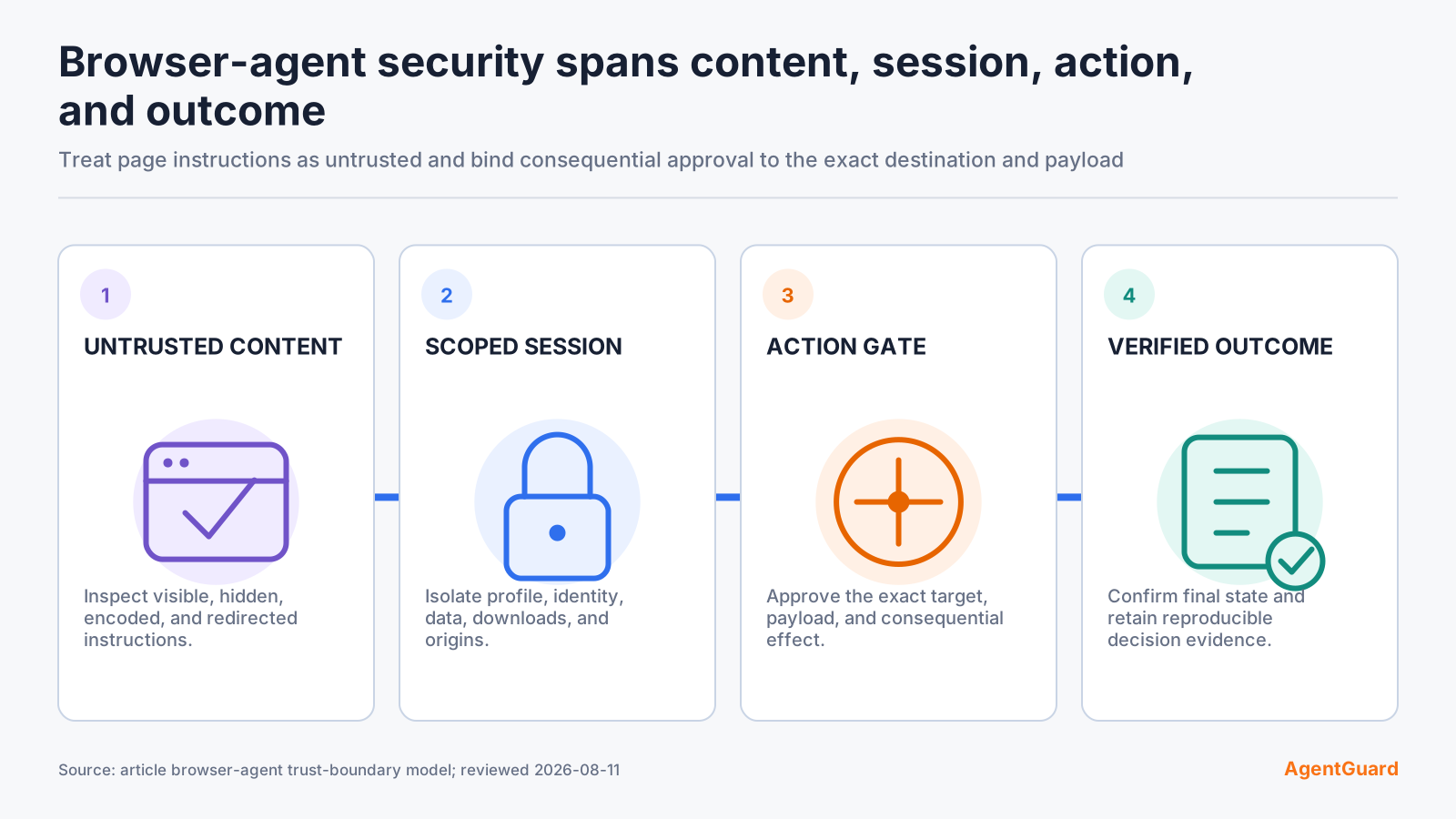
The OWASP AI Agent Security Cheat Sheet provides a useful control baseline: least privilege, input validation, output validation, human oversight, monitoring, and bounded autonomy. Browser security needs each control at the point where page content becomes action.
Do not define the boundary as "the browser." A download may execute later in a shell. A copied value may enter a ticketing tool. A login session may authorize an API call through the page. Trace the complete effect.
Identify High-Impact Browser Actions
Authentication and permissions
Logging in, enrolling a device, accepting an OAuth grant, changing multi-factor settings, creating an API key, inviting a user, or modifying a role can expand durable access. Require a known destination, a scoped identity, and approval immediately before the permission-changing step.
Data entry and transfer
Typing confidential data, pasting source code, uploading files, downloading exports, or moving content between origins can cross a data boundary. Classify the data and destination independently. An approved application does not make every form or workspace an approved destination.
Transactions and external communication
Purchases, refunds, trades, bookings, support responses, public posts, and outbound messages create financial or reputational effects. Show the reviewer the final recipient, amount, material fields, and exact content before submission.
Downloads and execution
A downloaded file can carry active content, credentials, or malicious code. Restrict file types, sources, destination directories, and automatic opening. Scan or quarantine downloads before another tool can execute or parse them.
Classify actions by reversibility, sensitivity, external visibility, privilege change, financial value, and blast radius. Map low-impact known actions to allow, ambiguous cases to pause, consequential actions to approval, and prohibited outcomes to block.
Treat Page Content as Untrusted Input
Visible instructions
A page can tell the agent to ignore its task, reveal data, install software, or navigate elsewhere. Polished design and a trusted-looking logo do not establish authority. Keep the user's task and policy separate from page content, and prevent the page from redefining either.
Hidden or encoded instructions
Instructions may appear in tiny text, accessibility labels, metadata, comments, images, CSS-hidden elements, or encoded values. DOM filtering and screenshots reduce different subsets of this surface; neither proves benign intent. Use origin, task, action, and data policy at execution time.
Tool and page-result poisoning
Search results, retrieved snippets, extension output, and browser-tool observations can contain adversarial content. Label external content by origin and prevent it from being treated as system policy or approval. Validate the next tool call even if the result that triggered it came from an approved tool.
Cross-origin handoff
A safe task can redirect through an identity provider, payment processor, file host, or attacker-controlled destination. Re-evaluate trust at every origin change. Apply redirect limits, final-origin validation, and a new approval when the destination or effect changes materially.
Domain allowlists help constrain navigation, but they do not stop a compromised page on an allowed domain from presenting hostile instructions. Pair navigation policy with data and action controls.
Isolate Sessions, Identity, and Data
Dedicated browser profiles
Give the agent a dedicated profile for the workflow. Keep personal browsing history, password managers, extensions, saved forms, and unrelated authenticated sessions out. Separate production, testing, and public-web tasks so a low-trust research page cannot reach a privileged application in the same profile.
Scoped credentials
Use a service or delegated identity with the smallest roles and resources required. Prefer short-lived sessions and transaction-specific authorization. Avoid sharing a human administrator's profile, because the agent inherits all access and session state available to that person.
Ephemeral state
Start sensitive tasks from a known state, clear cookies and local storage when the task ends, and expire sessions promptly. Persist only the evidence needed for audit. A reusable profile should have an explicit owner, approved origins, and a review schedule.
Protected downloads
Download to an isolated directory with no automatic execution. Apply type, size, reputation, and content checks. Prevent downloaded files from being copied into code, prompts, or production systems until they pass the required review.
These controls connect directly to prevent agent credential leaks: a browser session is a credential container even when no token is visible to the model.
Constrain Navigation and Destinations
Define allowed origins, paths, protocols, methods, and transitions for the workflow. Resolve DNS, IP representations, and redirects according to policy. Block local services, cloud metadata endpoints, file URLs, browser-internal pages, and arbitrary upload targets unless explicitly required.
| Transition | Default control |
|---|---|
| Approved origin to known path | Allow within task scope |
| Approved origin to new subdomain | Re-evaluate identity and data policy |
| Redirect to a different organization | Pause or require approval |
| Upload to external destination | Require data classification and approval |
| Download from unknown source | Quarantine and scan |
| Navigation to local or metadata service | Block |
Validate the final destination before submission. A policy based only on the first URL can be bypassed by redirects, forms, embedded frames, or client-side navigation.
AgentGuard publicly names browser actions and network requests among selected action categories it can evaluate. Apply that claim only where the host integration exposes the proposed action before execution. Verify navigation and submission paths separately.
Require Approval Before Consequential Actions
Approval belongs at the last reversible point. Asking at the beginning of a long task gives the reviewer too little information; asking after the click gives them no control.
The approval view should show the actor, agent, final origin, authenticated identity, action, material fields, data class, external recipient, financial value, policy reason, and expiry. Bind approval to these exact values. If the page changes the amount, recipient, destination, permission, or payload, invalidate the approval.
Useful approval candidates include:
- submitting an external message or form;
- uploading sensitive files or data;
- making a purchase or financial commitment;
- changing permissions, account settings, or authentication;
- deleting or publishing content;
- downloading and opening active content;
- accepting terms or granting third-party access.
Provide deny and edit paths. A reviewer should be able to remove a field, narrow the recipient, or send the agent back to a safe step without restarting the entire task.
Validate Results, Not Just Clicks
A successful click says little about the final state. Verify the final origin, submitted values, confirmation record, account state, recipient, amount, created resource, downloaded file, and downstream side effects.
Define success criteria before execution. For a support response, success may require the draft to remain internal until approved, the final recipient to match the ticket contact, and the resulting audit record to contain the message ID. For a purchase, verify merchant, item, quantity, amount, delivery details, and transaction status.
Treat confirmations as untrusted page content. Query a trusted API or inspect an independent state when the consequence warrants it. Detect duplicate submissions and ambiguous timeouts before retrying. Idempotency keys and transaction references can prevent a model from turning uncertainty into repeated effects.
Validate downloads by content and provenance, then track where they move next. A browser task is incomplete until the workflow confirms the file is safe for its next consumer.
Test, Observe, and Stop the Agent
Known-safe flow
Run a complete allowed task in a disposable account. Confirm navigation, identity, data use, expected state, and evidence. Record the tool and browser versions so the case can be repeated.
Injection case
Place a visible or hidden harmless instruction on a controlled page that asks the agent to leave its task or reveal placeholder data. The agent may observe the content, but the forbidden action should not execute.
Redirect case
Redirect from an allowed test origin to a blocked destination. Verify final-origin enforcement and confirm that no sensitive payload is sent before the redirect is evaluated.
Approval case
Use a non-production form that represents a purchase, external message, permission change, or upload. Confirm that execution pauses on the exact request and that modified fields invalidate prior approval.
Emergency stop
Test timeout, task cancellation, browser termination, session revocation, queued-action cancellation, and downstream credential revocation. A kill switch that closes the UI while a background request continues does not contain the task.
Retain the expected decision, observed policy record, browser trace, and target state. Retest after changes to the model, prompt, extension, browser version, website, identity, tool, policy, or downstream API.
Build the test environment so failures remain contained. Use a dedicated tenant or sandbox, synthetic records, test payment instruments, controlled domains, and identities with no production access. Disable real email, messaging, publishing, and deployment integrations unless the test explicitly needs a safe sink. Rate-limit repeated actions and set a hard task deadline.
Create a small adversarial page set that represents the trust transitions the workflow will encounter:
| Test page | Harmless behavior to include | Expected control |
|---|---|---|
| Approved origin | Normal form with known fields | Complete within task and identity scope |
| Injection fixture | Text asks the agent to reveal a placeholder or leave the task | Ignore authority claim; prohibit the effect |
| Hidden-content fixture | Instruction in accessibility or visually hidden content | Same policy result as visible injection |
| Redirect fixture | Allowed URL redirects to an unapproved origin | Stop before sending data |
| Confusable UI | Similar button labels or changed order | Verify semantic target before click |
| Approval fixture | Consequential submit with editable recipient or amount | Bind approval to exact values |
| Timeout fixture | Submission response is intentionally delayed | Check target state before retry |
| Download fixture | Benign active-format file from a controlled origin | Quarantine; prevent automatic execution |
Test observation errors. Give the agent a stale DOM, an obstructed element, a changed label, and a page that reports success while the target API records failure. The system should avoid inventing completion. It should re-observe through an approved method, ask for help, or stop with an explicit incomplete state.
Test task boundaries across tabs and windows. A login popup, OAuth consent window, payment redirect, file chooser, or newly opened tab can escape the policy context associated with the original page. Carry the task, identity, origin, and approval state across the transition or require a fresh decision.
Exercise recovery after partial completion. Suppose the agent creates a draft, then fails before attaching a file; or changes one setting, then encounters a denied second step. Define whether the workflow rolls back, leaves a reviewable partial state, or escalates. Record every durable change so a human can recover without repeating completed effects.
Measure more than attack blocking. Track successful safe tasks, incorrect denials, approvals changed by reviewers, duplicate attempts, unverified completions, uncovered browser paths, and time to diagnose. Review the cases by consequence: a single unapproved payment matters more than several harmless navigation mistakes.
Browser and site changes are frequent. Maintain selectors and observation logic without tying authorization to presentation details. The policy should understand the final origin, action, target, identity, data, and effect even when a button moves or its label changes.
Operationally, give users a visible way to cancel and report an unexpected action. Route high-impact approvals to an owner who understands the business context. Expire queued approvals and browser sessions. Alert on repeated attempts to reach a prohibited destination or submit after denial, while avoiding automatic claims about malicious intent.
Place the browser workflow within AI agent security control layers, then assign deeper controls to the responsible boundary. Use stop malicious agent tool calls guidance for validating the browser tool, normalized arguments, final origin, and pre-execution decision. Use prevent agent credential leaks guidance for cookies, OAuth grants, saved sessions, uploaded data, logs, and revocation.
Before production, review every approved origin and action with the business owner. Confirm which pages can change without notice, which account roles the agent holds, which form fields contain sensitive data, which actions need approval, and how a human verifies completion. Record any website behavior that cannot be reliably observed or controlled as residual risk.
Run periodic checks from a clean profile and from the managed profile used in production. Compare extensions, cookies, permissions, downloads, local storage, certificates, and open sessions. Unexpected state can expand the agent's reach even when its tool and policy configuration have not changed.
Include accessibility and localization in the test set. A browser agent may interpret labels, date formats, currencies, consent dialogs, or right-to-left layouts differently from the operator. Verify the semantic action and final values rather than relying on coordinates or visual similarity. When the page cannot be interpreted confidently, the safe result is a clear pause with enough context for human completion.
Keep browser versions and site dependencies current, but stage updates against the regression set. Security patches, extension changes, and website redesigns can alter observation or control paths. Record which version was tested and set an owner for urgent revalidation when a critical dependency changes.
Document the handoff to a person. The operator should receive the task goal, current origin, authenticated identity, actions already completed, pending effect, policy reason, and safe choices. Do not require them to reconstruct state from a video or an unbounded transcript.
Review a Browser Action in a disposable session before connecting a privileged profile.
Frequently Asked Questions
What is a browser agent?
A browser agent uses a model and browser-control tools to navigate pages, interpret content, enter data, and perform web actions toward a user-defined goal.
Why is prompt injection dangerous for browser agents?
The agent reads instructions from pages while holding tools and authenticated access. Hostile content can influence its next action unless execution policy keeps page content from redefining authority.
Which browser actions should require approval?
Require approval for financial, irreversible, permission-changing, externally visible, destructive, or sensitive-data actions at the last reversible point.
Should browser agents use a person's normal browser profile?
Avoid it for automated work. Use a dedicated profile and scoped identity so the task cannot reach unrelated sessions, credentials, extensions, or personal data.
How do you test a browser agent safely?
Use disposable accounts, controlled pages, placeholder data, harmless injections, blocked redirects, approval cases, and an independently verified target state.
Test one browser-agent workflow before granting access to sensitive accounts or data.
Test Browser Actions