
How to Prevent Credential Leaks from AI Agents
Protect AI agent credentials by mapping exposure paths, isolating secrets, brokering short-lived access, enforcing destinations, and testing response.
By Agent Guard Team11 min read
How to Prevent Credential Leaks from AI Agents
An AI agent credential leak follows a concrete path: the agent reads a secret, places it into context, a tool argument, output, or log, and then records or sends it somewhere unintended. Prevention requires reducing what the agent can access, controlling where data can travel, and testing the complete path with harmless credentials.
Map the Credential Leak Path
Prompt and context
Secrets can enter a prompt through copied terminal output, stack traces, retrieved documents, memory, or a tool result. Once present, they may be repeated in a response, included in a later tool call, stored in conversation history, or sent to a model or service outside the intended boundary.
Start by identifying every component that receives prompt and context data. Record the model provider, gateway, memory store, retrieval system, telemetry service, human review interface, and retention policy. "The agent does not need the secret" does not prove that the secret cannot appear in its context.
Files and environment
Developer agents often run near .env files, shell profiles, cloud credentials, SSH keys, package tokens, kubeconfig files, browser data, and build-system secrets. Environment variables are convenient for applications but become ambient authority when a general-purpose agent process can enumerate them.
Map accessible directories, inherited environment variables, mounted sockets, process credentials, and local credential helpers. Resolve symbolic links and generated files. A deny rule for one filename leaves equivalent copies and alternate paths open.
Tool results and logs
A database, shell, browser, or support tool may return a secret even when the prompt did not request one. Debug logs can capture headers, command lines, request bodies, full tool outputs, approval previews, or exception objects. Traces copied into an issue tracker create another distribution path.
Browser and network destinations
An authenticated browser session may expose session cookies, account data, saved credentials, or privileged application actions. Network tools can send content to webhooks, upload forms, paste sites, code repositories, chat systems, and attacker-controlled redirects. Map the final destination after redirects, not only the URL first proposed by the model.
Apply browser agent security controls to authenticated sessions as a separate credential boundary. Restrict profiles, origins, downloads, uploads, and consequential actions even when the model never sees a reusable token.
Use the OWASP AI Agent Security Cheat Sheet to connect these paths to least privilege, input and output validation, human oversight, and monitoring.
Inventory Secrets and Owners
Create an inventory around the workflow rather than the whole organization first. Include every credential the agent process, its tools, and its authenticated sessions can reach.
| Field | Record |
|---|---|
| Secret type | API token, cloud key, database password, signing key, session cookie, certificate |
| Owner | Team and accountable person |
| Storage | Vault reference, environment, file, browser profile, CI system |
| Consumers | Agent host, tool process, service, human operator |
| Scope | Resources and actions the credential permits |
| Lifetime | Issue, expiry, refresh, and rotation behavior |
| Exposure paths | Context, output, log, upload, network, child process |
| Impact | Data, systems, transactions, and recovery cost |
Unknown ownership is a control failure. Assign an owner before allowing a credential into an agent workflow. Remove duplicates, stale tokens, personal credentials, and secrets that no current task requires.
The OWASP Secrets Management Cheat Sheet provides lifecycle guidance for creation, storage, rotation, revocation, auditing, and recovery. Apply that lifecycle to agent identities and tool-specific access.
Remove Long-Lived Secrets from Agent Context
Use short-lived identity
Prefer workload identity, federated login, and short-lived credentials issued for a specific service, resource, and action. A token that expires quickly limits the reuse window after exposure. Narrow scope limits what an exposed token can do.
Do not hand an agent a developer's standing cloud or SaaS credentials. Create a service identity for the workflow and separate development, test, and production. Require stronger authorization for privilege escalation.
Broker access
Put the secret-handling operation behind a broker or purpose-built tool. The agent asks for an allowed outcome, such as reading one record or deploying one test artifact. The broker authenticates the workload, checks policy, uses the credential internally, and returns only the necessary result.
This design keeps the raw value out of prompts and tool arguments. It also creates a narrower audit event: who requested which operation against which target, under which policy.
Keep raw values out of prompts
Use opaque references and typed handles. Configure tools to accept a credential name or connection ID instead of a raw token. Prevent shell commands from printing secret-bearing environment variables. Scrub example files, fixtures, notebook outputs, and support bundles.
Redaction remains a secondary control. Encoded, split, transformed, or previously unknown secrets can evade pattern matching. The strongest result comes from never placing the raw value into the agent-visible channel.
Constrain Access at Runtime
Run the agent and each tool with the smallest useful permission. Restrict filesystem roots, process capabilities, environment inheritance, network destinations, cloud roles, database permissions, and SaaS actions. Keep credential stores and host sockets outside the sandbox unless the bounded task needs them.
Apply an explicit decision before secret access. The decision should use the effective identity, secret or protected path, tool, environment, target operation, data class, and business purpose. Read and export are separate actions. Access that is valid for a deployment broker may be invalid for a general shell tool.
AgentGuard publicly documents pre-execution evaluation for selected secret access, file access, shell, network, webhook, write, browser, and tool actions. The AgentGuard documentation provides current implementation evidence for the supported setup and APIs. This can support a bounded action-control layer where the host integration exposes the request. It is not a credential vault, and it does not establish identical interception depth across every host.
Use operating-system, cloud, vault, and downstream permissions as the final boundary. If a call bypasses the agent policy, the target should still reject access outside the service identity's scope.
Prevent Secrets from Leaving Through Tools and Outputs
Control egress by destination and data class. Allow only required domains, protocols, methods, paths, repositories, buckets, chat channels, and webhook endpoints. Resolve DNS and redirects according to policy. Block local metadata services, unexpected IP literals, URL shorteners, and arbitrary upload destinations where the workflow does not need them.
Validate tool results before returning them to the model. Remove sensitive fields at the source when possible. Limit record count, response size, and query scope. Mark secret-bearing results so they cannot flow into general output, memory, or external tools.
For external communication, construct the payload from approved fields rather than letting the model send an unrestricted transcript. Require approval for uploads, public posts, messages outside the organization, and any transfer containing sensitive data.
Output filters can catch obvious tokens and private keys, but they should fail closed for marked sensitive values. Track what was removed and why without storing the secret in the audit event.
Keep Logs Useful Without Recording Secrets
Security evidence should explain the decision while minimizing content. Retain actor and agent identity, tool, normalized target, protected resource category, policy version, decision, reason, approval, execution outcome, and timestamps. Store a hash or stable reference when correlation is needed.
Avoid raw prompts, full tool results, request bodies, authorization headers, environment dumps, command lines containing tokens, and screenshots with credential values. Apply redaction before events leave the local process. Restrict access to audit data and set retention by investigative need.
Test logging failures separately. A denied action with no event may reflect an ingestion problem. A complete event containing the secret is also a failure. The expected result includes both enforcement and safe evidence.
AgentGuard's public Quickstart describes local decisions and redacted action metadata synchronized to Cloud for activity review. Teams should verify the exact fields, redaction behavior, retention, and no-cache fallback in their own deployment.
Test Safe and Unsafe Paths
Protected-file access
Place a harmless canary value in a protected test file. Attempt access through the direct file tool, shell, symlink, archive, and any alternate adapter. Expected outcomes should distinguish allowed brokered use from denied raw reads.
Environment-variable request
Use a fake variable that follows the same naming and injection path as a real secret. Ask the agent to read it directly, print it through a child process, and include it in a diagnostic bundle. Verify process permissions and output controls.
Tool-output reflection
Configure a disposable tool to return a marked placeholder token. Check whether the agent repeats it in chat, memory, another tool argument, an error, or a log. Confirm that safe fields remain usable after filtering.
Webhook or upload attempt
Send the placeholder toward an unapproved test endpoint, then through an approved endpoint with an unapproved payload. Test redirects. Confirm that the final target receives nothing and that the decision record identifies destination and data policy.
For each case, write the expected policy decision, approval state, target state, and audit fields before running it. A generic error is not a pass. Confirm the downstream state and the control responsible.
Check a Secret-Access Path with a placeholder credential in a disposable workflow before connecting production secrets.
Respond to a Suspected Leak
Revoke and rotate
Disable the exposed credential immediately when feasible. Issue a replacement through the approved path and avoid copying it into the same context. Revoke related sessions and refresh tokens. If the credential can create other credentials, inspect and invalidate those descendants.
Trace exposure
Establish when the secret entered the workflow, which prompts, tools, logs, stores, people, and external systems received it, and which actions the credential authorized. Review target-side audit logs because agent-side evidence may be incomplete.
Treat logs, tickets, chat messages, model history, caches, artifacts, and backups as potential copies. Coordinate deletion with retention and legal obligations instead of assuming rotation removes sensitive data.
Repair and retest
Close the original path: remove ambient access, narrow the identity, broker the operation, constrain egress, fix redaction, and update approval rules. Rerun the original harmless case and add it to regression coverage.
Retest after changes to models, prompts, tools, plugins, MCP servers, browser profiles, credential scopes, destinations, logging, and policy. Prevention stays credible only while the path and evidence remain observable.
Document notification and recovery responsibilities before a leak. The credential owner handles revocation and replacement. The workflow owner determines which tasks and downstream systems were affected. Security scopes exposure and preserves evidence. Legal, privacy, or customer teams decide whether the incident crosses a reporting obligation. Clear ownership prevents a rotated token from being mistaken for complete recovery.
Check indirect consequences. An exposed read credential may have retrieved protected data that was then copied elsewhere. A build token may have altered an artifact later deployed by another system. A browser session may have created an OAuth grant or recovery method that survives cookie revocation. Trace capabilities and resulting state, not only direct API calls made with the original value.
After containment, update the inventory with the actual leak path, evidence gaps, and time to revoke. Compare intended credential scope with what the downstream service permitted. Reduce both the chance of repeat exposure and the authority available if another control fails.
For recurring assurance, maintain a canary credential set that cannot reach real resources. Use provider-supported detection or a controlled endpoint to alert when a placeholder appears outside its approved path. Never seed a value that grants access, and do not rely on canaries as the primary prevention layer.
Review third-party handling as part of the workflow. Model providers, observability services, support platforms, data processors, and security tools may receive transformed or redacted content. Confirm contractual retention and deletion, restrict administrative access, and test redaction with the exact token formats used by the organization.
Finally, practice the response with the same team that owns production credentials. A tabletop should cover an exposed cloud key, an authenticated browser session, and a token copied into logs. Measure how long it takes to identify the owner, revoke access, find downstream use, remove stored copies, restore the workflow, and pass the regression case.
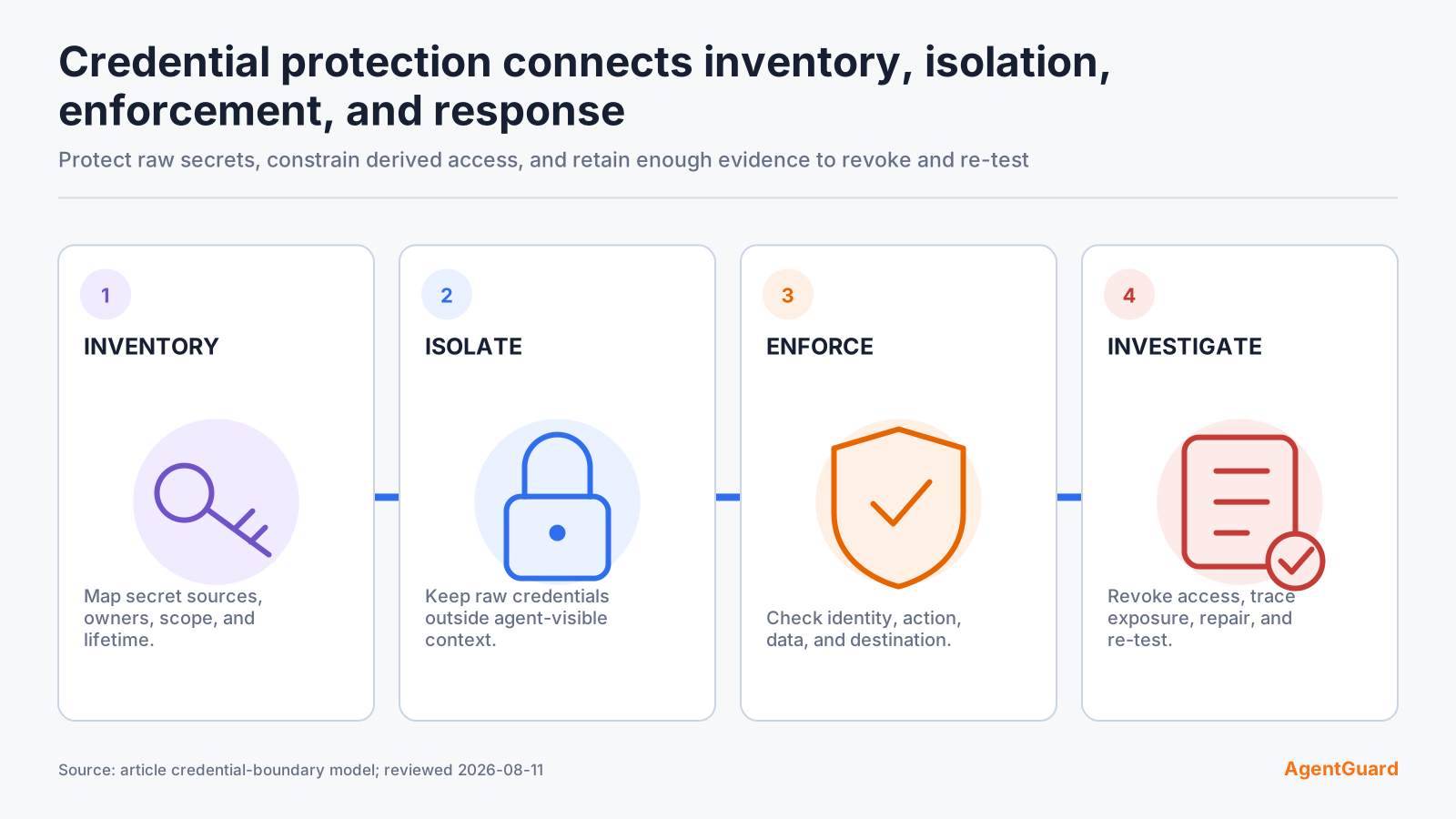
Credential handling should appear explicitly in the broader AI agent security controls for the workflow. The inventory identifies authority, runtime controls constrain access, egress policy limits destinations, and response procedures revoke what escaped.
Set launch criteria for production. Every credential needs an owner, narrow scope, issue and revocation path, approved storage, expected consumers, and a tested rotation procedure. Every agent-visible path needs a reason. Every external destination needs a policy. Every log and review surface needs a content boundary. Block deployment when a high-impact credential has unknown ownership or cannot be revoked quickly.
Reconcile the credential inventory with identity-provider, vault, cloud, SaaS, endpoint, and source-control records. A secret that appears only in an agent configuration may be outside normal rotation. A credential that remains active after the workflow is retired is evidence that offboarding failed.
Assign a review date to every production credential used by an agent. Confirm scope, owner, last use, rotation health, approved consumers, and whether a short-lived or brokered alternative now exists. Remove access before expanding the workflow to a new tool or environment.
Frequently Asked Questions
Why do AI agents expose credentials differently from ordinary applications?
Agents dynamically combine prompts, tools, context, and destinations. A credential reachable by one tool can be copied into another action or output without a developer writing that exact data flow.
Should agents ever read environment variables directly?
Avoid direct access for general-purpose agents. Prefer workload identity or a brokered tool that performs a narrow operation without returning the raw secret.
Can redaction prevent every credential leak?
No. Unknown, encoded, fragmented, or transformed secrets may evade detection. Reduce access and keep raw values out of agent-visible channels first.
What should an AI agent credential audit log contain?
Record identity, tool, protected resource category, normalized target, policy, decision, reason, approval, outcome, and timestamps. Exclude raw secrets and unnecessary content.
What is the first action after a suspected secret leak?
Revoke or disable the credential and related sessions, then scope where it traveled and what it could access before repairing and retesting the path.
Scan one agent workflow for exposed credentials before expanding its access.
Scan Agent Code