
How to Stop Malicious Tool Calls in AI Agents
Learn how to validate tool identity and arguments, enforce least privilege, gate high-impact actions, and verify AI agent tool-call outcomes.
By Agent Guard Team11 min read
How to Stop Malicious Tool Calls in AI Agents
A malicious tool call is an agent action whose effect exceeds the user's intent or the workflow's authorized scope. Stopping it requires a control path that verifies the tool, validates its arguments, applies real execution permissions, decides before the side effect, and records evidence that the decision worked.
Start at the Tool-Call Boundary
An agent tool call is a chain, not a single model output. The model interprets instructions, selects a registered tool, supplies arguments, and asks an adapter or runtime to execute. That execution may reach a filesystem, shell, browser, database, cloud API, SaaS account, or another service. The result returns to the model and can trigger a second action.
Risk can enter at every step. Untrusted content can alter the model's choice. A legitimate tool can receive a dangerous path or destination. A correctly formed request can run under an overprivileged identity. A safe first result can be used to construct a harmful next call.
The control boundary belongs immediately before the external effect. Model instructions and prompt filters can reduce unsafe proposals, but the execution layer must still decide whether this tool, with these arguments, under this identity, in this environment, may perform this effect.
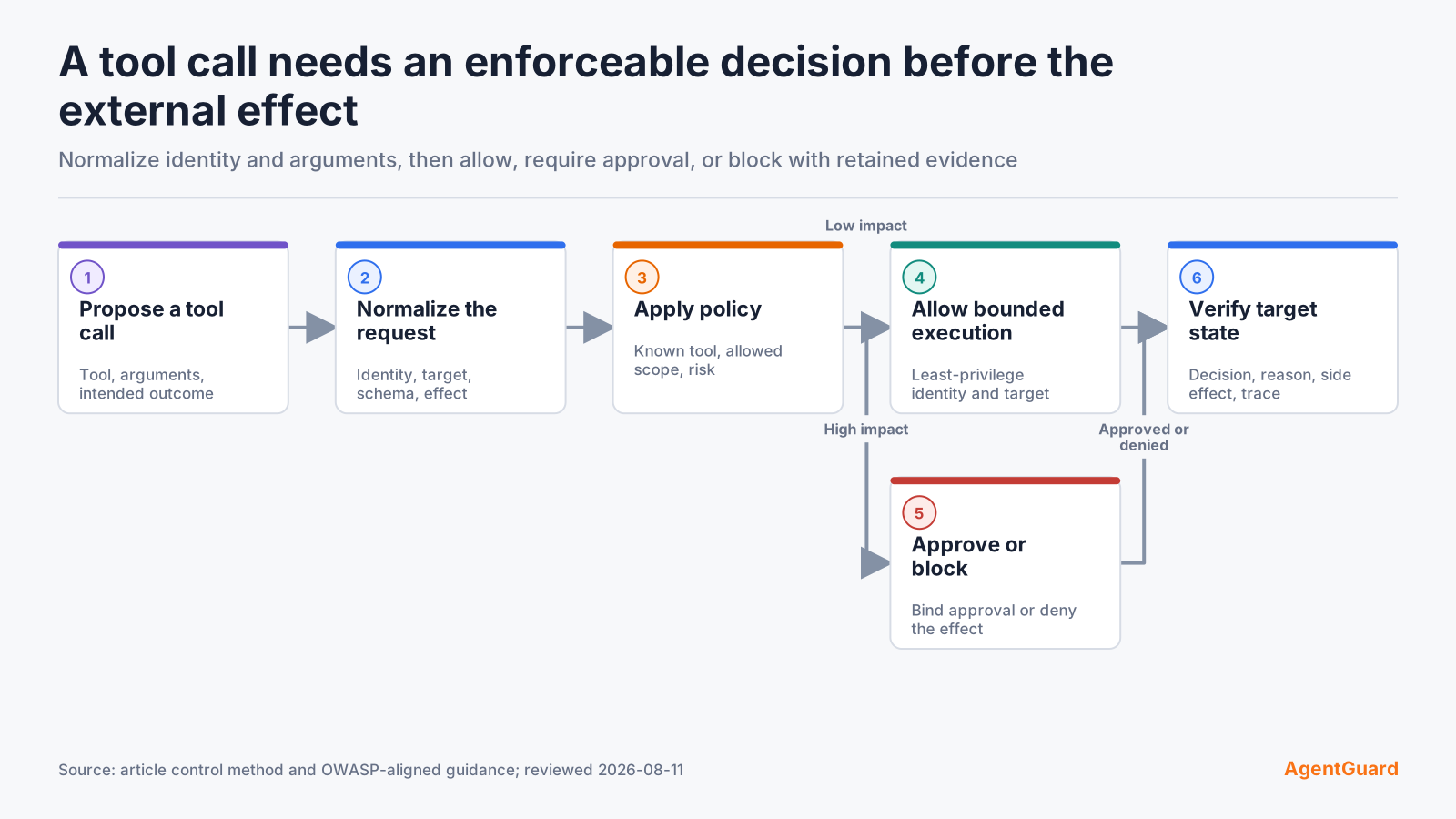
The OWASP AI Agent Security Cheat Sheet recommends least privilege, input validation, human oversight for high-impact actions, output validation, and monitoring. Translate those principles into an observable call path rather than a policy document that the runtime never enforces.
Define Allowed Tools and Outcomes
Begin with business outcomes. "Use the ticketing tool" is too broad. A useful allowance might be: read tickets in project A, add internal comments, and create a draft issue under the service account assigned to the support agent. Closing tickets, inviting users, changing permissions, and exporting attachments remain separate outcomes.
For each outcome, record:
| Field | Question |
|---|---|
| Owner | Who accepts the risk and approves changes? |
| Environment | Where may the action run? |
| Identity | Which service or user identity is allowed? |
| Tool | Which exact registered tool and version may execute? |
| Target | Which projects, paths, domains, accounts, or resources are in scope? |
| Data | Which data classes may be read or sent? |
| Effect | Is the action read-only, reversible, external, financial, privileged, or destructive? |
| Evidence | Which decision and target-state records must exist? |
Default-deny is practical only when the allowed set is specific and testable. Keep separate allowances for read, write, send, delete, permission change, payment, and code execution. Expire temporary exceptions and tie them to an owner.
Validate Tool Identity and Arguments
Verify the registered tool
Resolve a tool call to a trusted registration, implementation, version, and owner. Names and descriptions are untrusted metadata. Reject duplicate or shadowed names, unsigned replacements where provenance matters, and tools that do not match the approved registry.
For MCP-based workflows, the official tools specification explains discovery and invocation. The protocol can describe a tool and its input schema; the host still owns consent, authorization, validation, and safe execution.
Constrain paths, commands and domains
Validate normalized values. Resolve relative paths and symbolic links before applying a filesystem rule. Parse URLs, follow redirect policy, and compare the final origin. Tokenize commands with an allowlisted executable and flags instead of applying a substring check to a shell string. Validate cloud resource IDs, database scope, HTTP methods, and content type.
Reject values that cross the intended boundary: parent-directory traversal, wildcard expansion, command substitution, unexpected protocols, loopback and metadata endpoints, alternate IP encodings, unapproved redirects, or a write method disguised by a generic tool name.
Reject ambiguous or oversized arguments
Apply strict schemas with required fields, types, length limits, enumerations, and unknown-field rejection. Canonicalize once, then make the policy decision on that representation. If the intent depends on a free-form blob that cannot be safely parsed, route it to approval or a restricted interpreter.
Do not silently repair a dangerous request into something "close enough." Return a reason the agent can act on, without leaking sensitive policy details, and require a fresh proposal.
Enforce Least Privilege at the Execution Layer
Assume the model and the policy integration can fail. The tool process should still have the smallest filesystem, network, credential, and downstream permissions that let the bounded task work.
Use a dedicated service identity, short-lived credentials, read-only roles, scoped API tokens, restricted working directories, container or process isolation, and explicit egress policy. Separate build, test, and production identities. Keep sensitive sockets, SSH agents, browser profiles, cloud metadata endpoints, and credential files outside the runtime unless the task requires them.
| Layer | Useful restriction | Failure it contains |
|---|---|---|
| Tool registry | Approved implementation and version | Substituted or shadowed tool |
| Process | User, sandbox, filesystem, syscall limits | Local command or file abuse |
| Network | Destination, protocol, method, DNS and redirect policy | Exfiltration or internal probing |
| Credential | Short lifetime, narrow resource and action scope | Stolen or misused identity |
| Downstream service | Resource policy, transaction limits, audit | Bypassed agent policy |
An allow decision should not create privilege. It permits the runtime to use permissions already constrained at the target.
Gate High-Impact Actions
Allow low-impact known cases
Automatically allow actions that are well understood, low impact, reversible, and bounded to approved data and targets. Examples include reading a public document or listing test resources under a read-only identity. Log enough context to reproduce the decision without copying unnecessary sensitive content.
Require approval for consequential actions
Place approval immediately before the effect. Useful candidates include external messages, uploads, purchases, permission changes, production writes, secret access, code execution, and actions that are hard to reverse. The reviewer should see the normalized action, target, material arguments, data class, risk reason, and expiry.
Approval should bind to the exact request. If the target, arguments, identity, or policy changes, require a new decision. Time out parked requests and make the no-response behavior explicit.
Block prohibited outcomes
Block actions with no legitimate workflow need, such as sending credentials to an unapproved domain, modifying security controls, reaching cloud metadata, deleting protected data, or using an unknown tool implementation. A block reason should identify the violated boundary and the safe next action.
AgentGuard publicly documents Runtime Guard evaluation for selected shell, file, tool, network, secret, write, webhook, and browser actions. The AgentGuard documentation provides the current setup and API evidence. Treat that as a bounded implementation example. Host integration depth varies, so verify that every relevant adapter actually crosses the decision point.
Test the Decision Path
Known-safe case
Create a disposable target and a narrow identity. Run a known-safe call with valid arguments. Confirm that it executes, that the target state matches the expected result, and that the decision record identifies the effective policy.
Malformed argument case
Submit a harmless malformed value: a path traversal toward a nonexistent fixture, an unsupported HTTP method, an oversized field, or an unknown schema property. The call should be rejected before the tool runs.
Unauthorized destination case
Point a network or upload tool at a controlled domain outside the allowlist. Confirm the final destination remains untouched, including after redirects. Check that the evidence names the destination rule rather than reporting a generic application error.
High-impact analogue
Use a non-destructive analogue of a consequential action, such as deleting a nonexistent file in a temporary directory or sending placeholder data to a test endpoint. The expected result may be approval or block. Record it before execution.
Test each technical path. A shell wrapper, direct HTTP client, browser action, and MCP tool can produce the same business effect while bypassing different controls.
Test a High-Risk Action in a disposable environment and compare the policy decision with the target's observed state.
Verify Evidence and Failure Modes
Decision with evidence
Treat each audit event as a reproducible test artifact. Separate request context (agent, session, and effective identity), proposed action (registered tool, normalized arguments, and destination), control result (policy version, decision, reason, and approval), and observed outcome. Apply redaction before the event reaches shared storage, then verify that an investigator can explain the result without recovering sensitive input.
Denied call with no record
A failed request with no policy record may indicate broken connectivity, tool failure, schema rejection, or logging loss. It does not prove that the security control denied the action. Trace the request through the adapter and verify the downstream state.
Tool call that bypassed the integration
If the action executed without a decision, identify the alternate path and close it at the real execution layer. Instrument the adapter, remove its permission, route it through a controlled gateway, or record it as an accepted residual path with an owner.
| Symptom | Check first |
|---|---|
| Risky action executed | Did the call cross the instrumented adapter? |
| Safe action denied | Did normalization, identity, target, or policy version differ? |
| Correct decision, no event | Is enforcement healthy while logging or ingestion failed? |
| Different result on retry | Did policy, tool version, approval, or cached state change? |
| Approval never resolves | Is reviewer routing valid, and does the request remain parked? |
Operate and Re-test the Control
Assign owners to tools, policies, exceptions, identities, and evidence systems. Review exceptions before expiry. Remove unused tools and permissions. Track policy changes as code where possible, with review and rollback.
Retest when the model, system prompt, tool implementation, MCP server, plugin, credential scope, network route, policy, approval flow, or target API changes. Attach a small regression set to each high-impact action class: one allowed case, one denied case, and an approval case when relevant.
Roll out one workflow at a time. Begin in a non-production environment with an owner, an explicit tool inventory, and a known target set. Observe which legitimate calls are denied and which proposed actions arrive without enough context for a stable decision. Improve normalization and tool design before weakening a policy.
Move to monitor or approval mode only when its meaning is clear. A monitor-only period can reveal paths and argument patterns, but it exposes the environment to the underlying permissions. Use low-privilege identities and disposable targets during learning. Approval mode can contain ambiguity, but reviewers need service-level expectations and a clear timeout behavior.
Version the policy with the tool and schema it expects. When a tool changes from read_issue to a broad request operation, the old allow rule may become unsafe even if the tool name remains. Treat added arguments, new domains, expanded resource types, and new side effects as material changes.
Track a small set of operating measures:
- relevant calls observed compared with the known adapter inventory;
- allowed, denied, sanitized, and approval decisions by action class;
- false decisions confirmed through review, without treating user disagreement as ground truth;
- time to resolve an approval and time to diagnose a failed case;
- bypasses, expired exceptions, stale tools, and overdue retests;
- evidence events missing a target outcome or effective identity.
Do not optimize for the fewest denials. Optimize for correct outcomes under a bounded workflow. A policy that allows everything has low friction and no security value; a policy that blocks everything destroys the workflow. Paired cases and target-state checks reveal whether changes improve both safety and utility.
When an exception is required, bind it to the smallest identity, tool, target, action, environment, and time window. Record the owner and the condition that will remove it. Retest the original denied case after the permanent fix so the exception does not become an invisible policy branch.
The objective is not to predict every malicious prompt. It is to make unauthorized effects difficult to reach, interrupt consequential actions while intervention is still possible, and produce evidence that distinguishes an enforced decision from an accidental failure.
Place this control inside the wider AI agent security threat model. Tool policy covers the proposed action; component review, identity, data handling, downstream authorization, result validation, and incident response still carry separate responsibilities. When the tool is delivered through MCP, Model Context Protocol architecture also introduces host, client, server, transport, and downstream boundaries that need distinct owners.
Document the final production contract for every high-impact tool: approved implementation and version, schema, identity, destinations, data classes, allowed effects, approval requirements, failure behavior, event fields, and regression cases. Make the contract available to the team that changes the tool. A newly added parameter or destination should trigger review before it silently expands authority.
Run a periodic inventory reconciliation between registered tools, observed calls, process permissions, credentials, and downstream audit logs. Investigate any tool or path that appears in one source but not the others. This catches abandoned integrations, shadow adapters, and controls that stopped receiving traffic after an upgrade.
Include incident response in the tool contract. Operators need a way to disable the tool, revoke its identity, cancel queued approvals, stop running work, preserve bounded evidence, and verify downstream state. Practice the sequence with a disposable workflow so a kill action does not create a second unsafe effect.
Review denial messages for both safety and usefulness. They should identify the violated boundary and a permitted next step without exposing secret policy logic or protected data. Track repeated retries after denial; the agent may need a clearer error contract or a safer alternative tool.
Frequently Asked Questions
What makes an AI agent tool call malicious?
Its effect violates the authorized workflow, even if the tool and syntax are legitimate. Harm can come from the target, arguments, identity, data, timing, or downstream side effect.
Is a tool allowlist enough?
No. A trusted tool can receive unsafe arguments or run with excessive permissions. Validate the request and constrain the actual execution identity and target.
Which tool calls should require human approval?
Prioritize irreversible, financial, privileged, externally visible, destructive, or sensitive-data actions. Place approval directly before the effect and bind it to the exact request.
Where should tool-call validation happen?
Validate at the host or adapter before execution, then enforce least privilege again in the process, network, credential, and downstream service.
How should teams test a blocking rule safely?
Use disposable targets and harmless analogues. Define the expected decision and target state first, then verify both the policy record and the absence of the side effect.
Test one agent tool call before allowing it to change a real system.
Start Testing