
Unicode Prompt Attack Guide: Detect Invisible Instructions
Detect and control invisible or deceptive Unicode used to hide instructions in AI prompts and agent inputs.
By Agent Guard Team6 min read
Unicode Prompt Attack Guide: Detect Invisible Instructions
A Unicode prompt attack uses non-rendering, bidirectional, confusable, tag, variation, or other deceptive characters to make model-visible input differ from what a reviewer believes they saw. Defend by preserving the original input, decoding and visualizing code points, comparing normalized forms, applying context-aware policy, and constraining any tool action influenced by the text.
Define the security boundary
The keyword “invisible Unicode” has broad utility intent: people search for blank characters and copy/paste tools. The security task is narrower. It concerns text entering prompts, retrieved documents, code, tool metadata, agent skills, messages, or files where hidden characters can conceal instructions or alter interpretation.
Not every invisible character is malicious. Zero-width joiners support legitimate scripts, direction controls support bidirectional text, and formatting characters can be valid. A security control must distinguish expected language behavior from unexplained characters in a sensitive context.
Treat this as one form of prompt injection risk. The encoding technique hides or disguises content; the security impact occurs when the model or agent follows that content across a trust boundary.
Identify Unicode attack mechanisms
Relevant mechanisms include zero-width characters inserted inside words, Unicode tag characters that encode hidden text, bidirectional controls that reorder displayed source, homoglyphs that resemble trusted identifiers, unusual whitespace, variation selectors, and combining marks. Attackers can also split instructions across characters that a renderer suppresses or a filter interprets differently.
The key signal is representation mismatch. The raw bytes, Unicode scalar sequence, normalized string, rendered view, tokenizer input, and downstream parser may not agree. A denylist of one famous code point misses other categories and legitimate use cases.
The Unicode Consortium's Unicode Security Considerations documents spoofing, identifiers, visual confusability, and security handling. Use the standard to understand character behavior rather than inventing a universal “invisible character” list.
Inspect before normalization
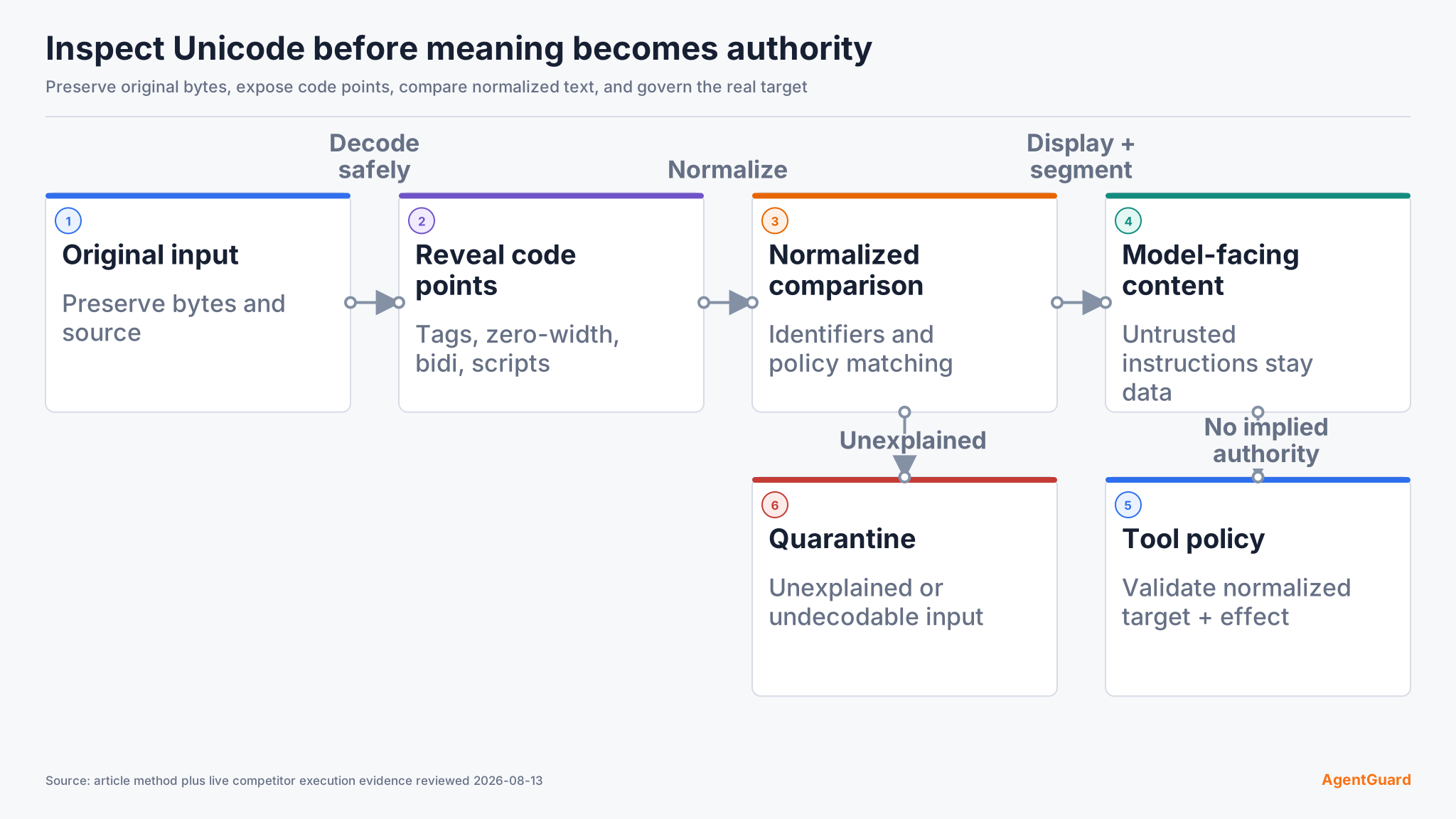
Preserve the original bytes and decoded string before changing anything. Record encoding, decoder errors, code points, character names, general categories, bidirectional classes, and source. If decoding fails, quarantine the input rather than silently replacing bytes and continuing.
Scan sensitive inputs for format controls, tag characters, unexpected zero-width characters, bidi overrides or isolates, confusable identifiers, noncanonical sequences, and abnormal character-category density. Evaluate where they appear. A zero-width joiner in a supported-language word is different from a long tag sequence in an MCP tool description.
Prioritize review by input surface:
- Identifiers and destinations: allow expected scripts, normalize before comparison, detect mixed-script confusables, and re-check after redirects or path resolution.
- Prompt and tool metadata: preserve original text, reveal controls and tags, compare the model-facing form, and treat embedded instructions as untrusted data.
- Retrieved documents and messages: retain source attribution, segment untrusted content, and prevent text from granting tool authority.
- Source code and configuration: reveal bidi and unusual whitespace, fail on decoder errors, and review the exact bytes that build or execute.
- Logs and review interfaces: escape controls so text cannot reorder, conceal, or overwrite surrounding evidence.
Log escaped representations and hashes, not raw secrets. The inspection output should let a reviewer reproduce the finding without executing or rendering the hidden instruction in an unsafe interface.
Pass condition: the pipeline can show exactly which code points differ from the visible representation. Failure path: quarantine undecodable or unexplained sensitive input.
Normalize for comparison, not blind deletion
Compute a normalized comparison form, commonly NFC or NFKC depending on the application's identifier policy, while retaining the original. Normalization can expose some equivalent forms and reduce confusable variation, but it does not remove every dangerous control and can change legitimate text.
Apply normalization consistently at comparison boundaries: allowlists, tool names, domains, file extensions, command verbs, and policy matching. Do not validate one representation and execute another. After normalization, resolve paths, redirects, and aliases before the final policy decision.
Avoid a blanket “strip all non-ASCII” rule. It breaks international content and still fails when the malicious instruction uses ASCII surrounded by hidden controls. Define allowed scripts and character categories for identifiers separately from free-form content.
Use three representations deliberately. Preserve the original for evidence. Produce a normalized comparison form for identifiers and policy. Produce a safe escaped display for reviewers. Never validate the escaped view and execute the original without applying the same final policy to the actual normalized target.
Make hidden characters visible
Security review interfaces should render markers for non-printing characters, show code-point labels, warn about direction changes, and provide side-by-side original and normalized views. Copy operations should not silently drop the markers while copying the underlying attack string.
For source code and configuration, use editor settings or linters that reveal unusual whitespace and bidi controls. For prompts and retrieved content, add a safe inspection view before high-impact use. For logs, escape controls so a malicious string cannot reorder or conceal the surrounding event.
Visualization supports review; it is not authorization. A reviewer can miss an ordinary-looking instruction that is semantically malicious even when every character is visible.
Control model and tool effects
Label untrusted content by source and keep it separate from higher-priority policy. Treat instructions found in documents, webpages, tool metadata, and user-provided files as data unless the application explicitly grants them authority. The OWASP Prompt Injection guidance covers the wider direct and indirect injection boundary.
Enforce deterministic policy before tool execution. Validate identity, tool, normalized arguments, destination, and effect. Require approval for consequential actions and bind it to the exact normalized request. An invisible instruction should not gain authority merely because the model decoded it.
AgentGuard publicly describes Deep Scan checks for prompt injection and selected pre-execution runtime decisions. Use the AI agent security architecture to combine input inspection with least privilege, sandboxing, and target-state verification. The product does not claim that Unicode scanning alone blocks every prompt attack.
Test the pipeline
Build fixtures for expected multilingual text, zero-width separators, tag-encoded text, bidi controls, confusable domains, decomposed characters, invalid UTF-8, mixed scripts, and an ordinary ASCII indirect instruction. Use synthetic secrets and harmless tool targets.
For each fixture verify original preservation, decoding, code-point report, normalized comparison, rendered warning, policy decision, model-facing form, tool-call decision, and target state. Include false-positive cases from languages your users actually write.
The success criterion is not “all Unicode removed.” Legitimate text remains usable; deceptive representations are surfaced; policy sees the same normalized identifiers that execution uses; and unauthorized effects do not occur.
Test failure paths at three layers. If decoding or code-point inspection fails, quarantine the input. If normalization or confusable analysis is unavailable, block sensitive identifiers instead of comparing raw text. If model-side analysis fails, deterministic tool authorization must still prevent an external effect. This keeps a detection outage from becoming permission.
Record false positives by language, script, character sequence, input field, and control decision. Fix the narrow policy or renderer rule rather than adding a global bypass for all Unicode. Re-run the malicious analogue and the legitimate language sample after every adjustment.
Respond and regress
When hidden instructions are found, quarantine the source, preserve original and decoded evidence, identify where it entered, search for the same hash or code-point sequence, and revoke any credentials or actions it exposed. Do not paste the raw payload into chat or a ticket renderer that may hide it again.
Re-run after decoder, normalization library, tokenizer, model, prompt template, retrieval pipeline, editor, renderer, tool schema, or policy changes. Add every confirmed mechanism to regression fixtures without turning the fixture into a production secret.
Use the current AgentGuard documentation to verify available scan and policy interfaces for your integration. A product integration remains one layer; application-specific normalization and authorization stay with the application.
Frequently Asked Questions
Are zero-width characters always malicious?
No. They support legitimate writing systems and formatting. Context, location, script expectations, and hidden semantic content determine risk.
Should prompts be normalized before sending them to a model?
Preserve the original, compute a comparison form, visualize differences, and apply policy. Blind normalization can alter meaning and does not replace execution controls.
Can a model read characters that a user cannot see?
Model tokenization and preprocessing can preserve or transform characters differently from a UI renderer. Test the exact application pipeline instead of assuming the views match.
Why not block all non-ASCII input?
That excludes legitimate languages, names, and data while failing to address ordinary-text prompt injection. Use context-aware identifier rules and control downstream authority.
Reveal hidden code points before policy or tool execution.
Inspect input