
What Is an MCP Server?
Define an MCP server, its primitives, request flow, deployment forms, boundaries, examples, and security considerations without becoming an implementation guide.
By Agent Guard Team6 min read
What Is an MCP Server?
An MCP server is a program that exposes tools, resources, and prompts to AI applications through the Model Context Protocol. It gives an MCP client a standard way to discover available capabilities, read permitted context, and request actions; it does not itself mean a separate physical server or a trusted service.
MCP server: quick definition
The word “server” describes the protocol role. An MCP server can be a local process started by an AI application, a service running on another machine, or a hosted endpoint. Its job is to implement MCP messages and expose selected capabilities from another system.
The official MCP introduction describes MCP as an open standard for connecting AI applications to external systems. The protocol standardizes the connection; each server still decides what data and actions it makes available.
Where the server fits
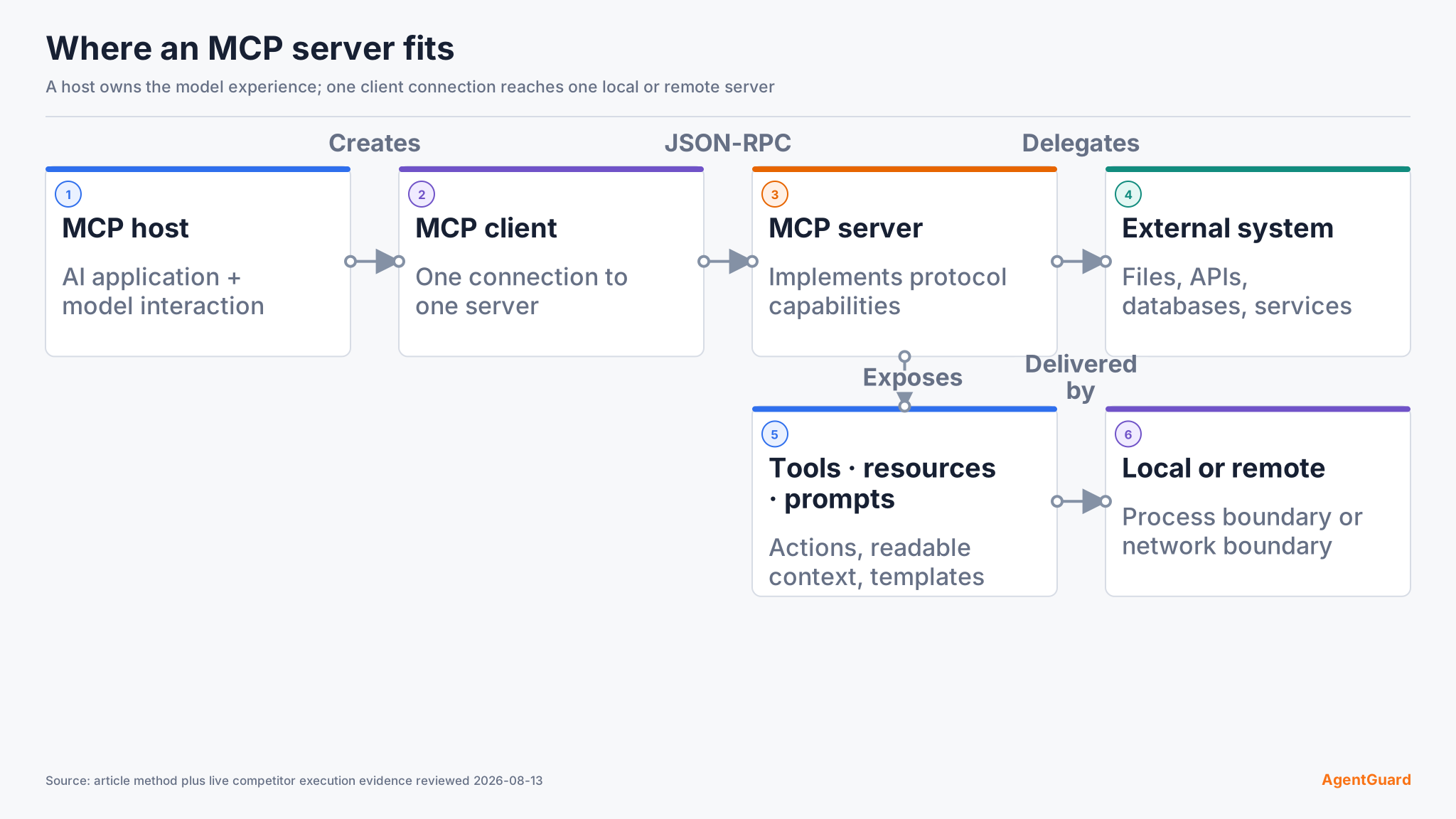
An MCP host is the AI application that manages one or more client connections. An MCP client is the protocol component that maintains a connection to one server. The MCP server responds to that client and connects its exposed capabilities to files, databases, SaaS products, developer tools, or custom services.
This role boundary is why the Model Context Protocol definition and this glossary page are separate. The protocol page defines the whole standard; this page focuses on the server component and the reader's trust decision.
The model may influence which capability is requested, but the host, client, server, and downstream service perform deterministic protocol and authorization work. Calling the model the MCP client hides those implementation boundaries.
What an MCP server exposes
Tools are callable operations. A tool might search tickets, query a database, create an issue, or run a bounded developer action. Its description and input schema help a client and model understand how to request it.
Resources are data the client can read, often identified by URIs. They can represent files, records, documentation, or application-specific context. Prompts are reusable templates or workflows the server makes available. Not every server implements all three primitives.
The primitives are declarations, not automatic permission. A tool schema can say a path is a string while the handler still needs path normalization and authorization. A resource URI still needs identity and tenant checks. Prompt text remains untrusted when it comes from an external server.
How a request works
The host creates a client connection to a selected server. The participants initialize the session and negotiate supported capabilities. The client can list tools, resources, or prompts. When the application chooses an operation, it sends a protocol request with the relevant arguments. The server validates the request, performs or delegates the operation, and returns a result or error.
For a protected remote server, authorization occurs before protected access. The server validates the access token and still checks whether the identity may perform the requested tool action. For a local process, operating-system permissions, configuration, and process isolation are central.
Results return to the application and may enter model context. That makes both directions security-sensitive: untrusted input can reach the model, and model-influenced requests can reach external systems.
Local and remote servers
A local server commonly uses standard input and output. The host starts a command from configuration and communicates with the child process. This is convenient, but installing the package can grant the process the user's files, environment variables, and network access unless the host restricts it.
A remote server uses a network transport and can serve multiple users or clients. It needs TLS, identity, authorization, tenant isolation, rate limits, and operational controls. Remote does not automatically mean safer; local does not automatically mean private.
Deployment type changes the threat model, authentication method, update path, and evidence. Record it before selecting a server or applying a generic security checklist.
Concrete examples
A source-control MCP server can expose repository search and issue creation. A database server can expose schema resources and read-only query tools. A support server can retrieve tickets and add approved comments. A local filesystem server can expose bounded directories to a coding assistant.
Each example should narrow capability. “Manage source control,” “run SQL,” or “access files” is too broad for a trust decision. Identify exact tools, identities, destinations, read/write effects, and approval requirements.
MCP server vs adjacent concepts
The terms identify different technical roles:
- API: an interface a program exposes; an MCP server can call APIs and present the result through MCP primitives.
- Plugin: a product packaging or extension concept that may use MCP internally.
- Tool: one callable capability exposed by a server, not the server itself.
- Gateway: a component that proxies or governs connections to one or more servers.
- Registry: a service that lists or distributes server information.
- Host: the AI application that manages MCP clients and model interaction.
These components can be combined in one product, but their trust and failure boundaries remain distinct.
Security and trust boundaries
An MCP server can execute code, read data, use credentials, and influence model context. Review provenance, tool metadata, dependencies, permissions, network destinations, authentication, and runtime behavior before granting access. Pin accepted artifacts and re-review changes.
The official MCP Security Best Practices covers protocol concerns such as authorization and confused deputies. The MCP security tools guide compares additional scan and runtime evidence surfaces.
Treat server approval as a scoped decision, not a permanent label. Record the accepted artifact, version, capabilities, identities, destinations, and runtime controls, then repeat the review when any of those inputs change.
AgentGuard publicly describes MCP server scanning and selected runtime policy evidence, with a stated limitation that it cannot fully monitor or block every third-party MCP runtime call. Place those capabilities inside wider AI agent security controls rather than treating a scan as permanent trust.
Frequently Asked Questions
Does an MCP server contain an AI model?
Not necessarily. Most servers expose external data or operations. The host application typically owns the model interaction.
Is an MCP server the same as a REST API?
No. A server may wrap REST APIs, but it implements MCP discovery and primitives. The underlying API and its authorization still exist.
Can one MCP server expose many tools?
Yes. Review and authorize each capability. A large tool set increases context and permission surface and can make changes harder to detect.
Are local MCP servers safe?
Local execution removes a network hop but can inherit broad user access. Verify the artifact, restrict filesystem and network access, and avoid exposing credentials.
Why do MCP servers need security review?
They sit between model-influenced requests and real systems. A compromised, malicious, or overprivileged server can expose data or cause actions beyond the user's intent.
Review an MCP server's exact capabilities before granting data or action access.
Inspect servers