
How to Scan an MCP Server Before Installation
A reproducible pre-installation MCP server scan process covering provenance, privileges, code, sandbox behavior, tool metadata, decision criteria, and regression.
By Agent Guard Team13 min read
How to Scan an MCP Server Before Installation
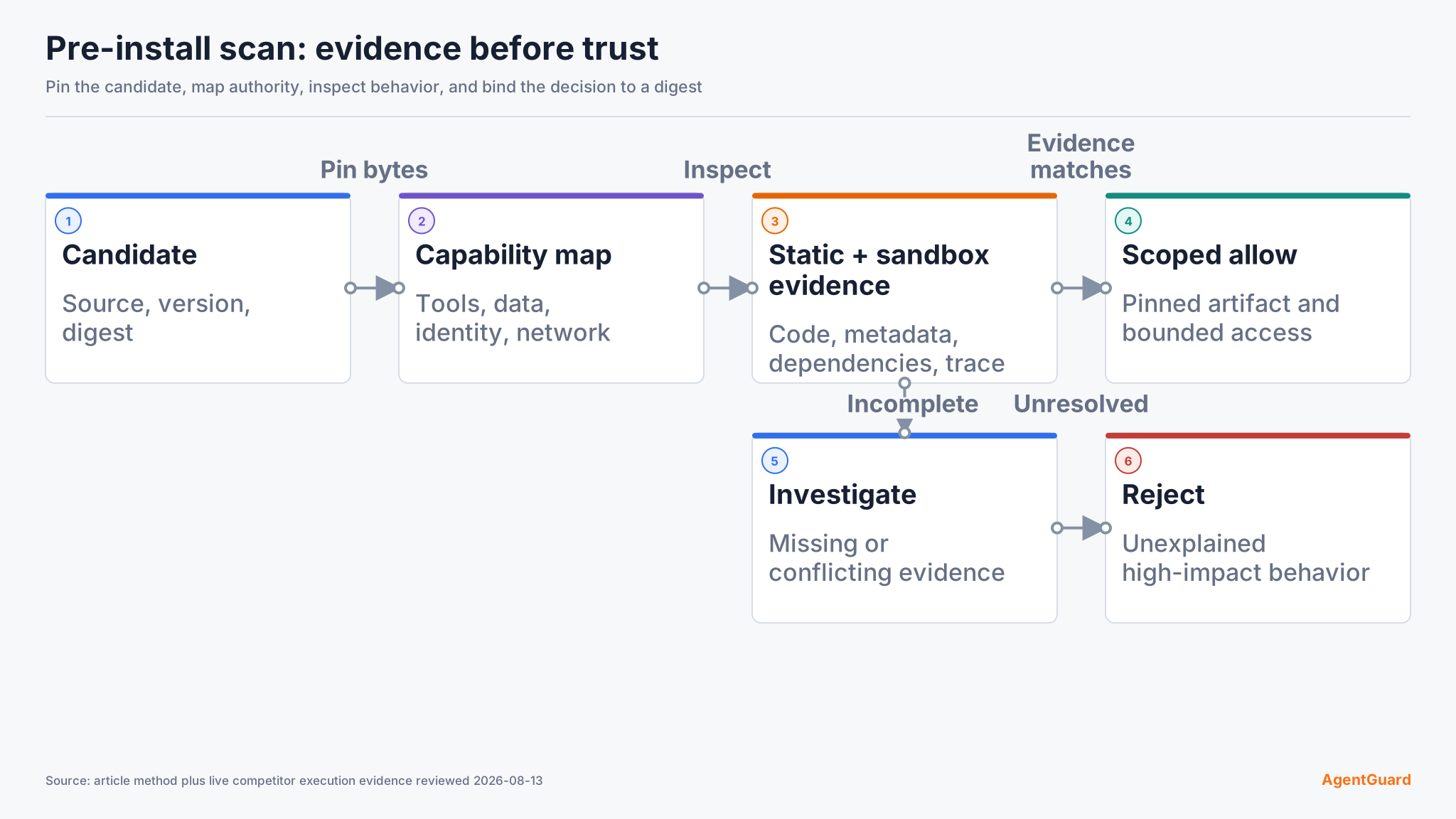
Scanning an MCP server before installation means inspecting the package, code, declared tools, permissions, network behavior, and integrity before your agent host starts it. A useful scan ends with an explicit allow, investigate, or reject decision, plus evidence that another reviewer can reproduce. It does not prove the server will remain safe after an update or during every runtime call.
Set a pre-installation decision boundary
Do not begin by running the server on a developer laptop. Start with an immutable candidate: a repository commit, release archive, package version, container digest, or downloaded binary and its checksum. Record the source URL, publisher, version, retrieval time, and hash. If the supplier cannot identify the exact artifact you are reviewing, the decision is already incomplete.
The boundary matters because an MCP configuration can start a local server command as soon as the host loads it. The Snyk Agent Scan documentation explicitly warns that scanning an MCP configuration may execute the commands and arguments in that configuration. A scanner therefore needs its own isolated environment, blocked credentials, restricted networking, and disposable storage. Treat the scanner as analysis infrastructure, not as a safe way to open an unknown package on your normal workstation.
Write the decision rule before collecting findings:
- Allow only when the source, artifact, requested capabilities, and scan findings match an approved use case.
- Investigate when evidence is incomplete, code is obfuscated, a binary cannot be traced to source, or a tool requests broader access than the use case needs.
- Reject when the artifact contains credential theft, destructive commands, hidden prompt instructions, undeclared network destinations, persistence, or an unverifiable post-install script.
Place this package review inside an AI agent security threat model. The server artifact is one trust boundary; the host, model, credentials, tools, data, and downstream systems create others that the package scan cannot settle.
Step 1: Verify source and artifact identity
Check the registry or repository owner, release history, signing information, maintainer activity, and the exact path from source to the artifact you will install. A familiar project name is not enough. Typosquatted packages, transferred namespaces, compromised maintainer accounts, and replaced release assets can preserve a convincing name while changing the code.
Pin the candidate by digest or commit. For a source repository, record the commit SHA and whether the release tag resolves to that commit. For a package, record its package-manager integrity value and inspect lifecycle scripts. For a container, use the image digest rather than a mutable tag. For a binary, require a publisher checksum or signature and verify it independently. Do not accept a screenshot of a checksum as proof; save the value and the verification output.
Pass condition: a reviewer can retrieve the same bytes from the recorded source and reproduce the hash. Failure path: quarantine the candidate when the release is mutable, the binary has no traceable build source, or the package provenance cannot be established.
Step 2: Inventory tools, resources, prompts, and privileges
An MCP server can expose tools, resources, and prompts to a client. List every advertised primitive and translate each tool into an external effect: read a file, write a file, execute a process, query a database, send a network request, create a ticket, post a message, or use a credential. Tool names and one-line descriptions are not a privilege model.
For every tool, capture its input schema, default values, optional arguments, destinations, filesystem paths, command construction, and credential source. Look for wildcard paths, arbitrary URLs, raw shell fragments, environment-variable access, and parameters that cross tenant or project boundaries. Compare the requested access with the reader task. A documentation lookup server should not need write access to a home directory or unrestricted outbound connections.
Review the Model Context Protocol architecture before approving privileges. Tools, resources, and prompts have different roles, but each can introduce content or capabilities that cross the agent's trust boundary.
Pass condition: every capability has a named owner, a justified use case, and a bounded identity. Failure path: remove unused tools, narrow scopes, or reject the server when the privilege cannot be separated from the package.
Step 3: Inspect code and package behavior
Run static analysis against the pinned artifact without granting production credentials. Inspect dependency manifests, install hooks, process creation, dynamic code loading, filesystem writes, network clients, secret discovery, telemetry, and update behavior. Search tool descriptions and prompt templates as well as executable code. MCP tool poisoning can place instructions in metadata that a model sees even when a human interface does not display them.
Do not reduce this step to a malware signature scan. A server can be harmful while using legitimate libraries and valid APIs. The relevant question is whether its behavior matches the declared purpose and your approved boundary. Flag encoded payloads, generated command strings, remote script downloads, disabled TLS verification, broad directory traversal, and endpoints assembled from untrusted input. Check transitive dependencies and lockfiles; an innocuous top-level package can still introduce a compromised dependency.
AgentGuard's public product page describes Deep Scan for skills, plugins, MCP servers, and agents, including checks for prompt injection, malicious tools, credential leaks, and backdoors. The current public documentation exposes general scan, URL-scan, and registry-scan workflows; an MCP-specific API endpoint is not currently verifiable. That evidence supports using AgentGuard as one input in this step, not a claim that one scanner proves safety. The product FAQ also states that AgentGuard cannot fully monitor or block all third-party MCP runtime calls.
Pass condition: no unexplained high-impact behavior remains, and each accepted finding has a documented rationale. Failure path: preserve the artifact and report, request source clarification, or reject it. Never edit a suspicious package in place and then pretend the reviewed artifact is the supplier release.
Step 4: Observe the server in an isolated environment
Static inspection cannot reveal every runtime branch. Start the pinned artifact only in a disposable environment with synthetic data, no personal credentials, read-only source mounts, a restricted service identity, and deny-by-default egress. Record process creation, child processes, file reads and writes, DNS lookups, outbound connections, and tool-list changes.
Exercise each declared tool with harmless inputs, malformed inputs, boundary values, and an unauthorized target. Confirm that schemas are enforced after normalization, not only in a user interface. If a tool accepts a path, test traversal and symbolic-link behavior. If it accepts a URL, test redirects, loopback addresses, cloud metadata ranges, and an unapproved domain. If it invokes a command, verify that arguments are not concatenated into a shell string.
The goal is not to make the server perform a real destructive action. Use a harmless analogue in the sandbox and verify the policy result and target state. A denied request should leave no file, message, database change, or network effect behind.
Pass condition: observed behavior matches the declared inventory and remains inside the sandbox policy. Failure path: retain the trace, stop the process, and reject or escalate any undeclared network call, persistence attempt, secret access, or tool mutation.
Step 5: Review tool descriptions for poisoning and drift
Tool descriptions are security-sensitive input. The OWASP MCP Tool Poisoning page describes malicious instructions embedded in MCP tool metadata as an indirect prompt-injection attack. Review the complete description returned over the protocol, not only the label shown by the client. Compare it with repository text and the publisher's documentation.
Look for instructions that redirect the model, suppress confirmation, request unrelated data, prefer one tool over safer alternatives, or hide actions from the user. Record a hash of the accepted tool list and descriptions. This creates a baseline for detecting a rug pull or compromised update later.
Pass condition: descriptions explain function and constraints without hidden behavioral directives, and the accepted metadata baseline is stored. Failure path: reject the server or disable the affected tool; do not rely on a user promise to ignore metadata the model will still receive.
Step 6: Make and record the installation decision
Combine provenance, capability review, static findings, sandbox traces, metadata inspection, and dependency results. A clean scanner exit is only one input. The final record should name the artifact, hash, reviewer, date, approved host, allowed tools, granted identity, network destinations, open findings, exception expiry, and decision.
Keep the record small enough to review but precise enough to reproduce. Attach the raw scan reference and sandbox trace location rather than pasting an unreadable event stream into the approval. For each accepted finding, state the affected component, why the behavior is necessary, which control limits it, who owns the exception, and when the exception expires. A reviewer should be able to disagree with one finding without repeating the entire scan.
Separate evidence from judgment. The hash, tool schema, requested scope, observed destination, and scanner finding are evidence. Allow, investigate, and reject are decisions based on that evidence and the approved use case. This separation makes a later regression review useful: the team can see whether the artifact changed, the use case changed, or only the risk decision changed.
Use severity together with reachability and requested privilege. A suspicious code path that cannot execute in the approved configuration is different from a post-install script that runs automatically, but both need evidence. When evidence conflicts, choose investigate rather than averaging scores. When a critical behavior is unexplained, reject.
AgentGuard can contribute a documented scan result and, for supported integrations, a pre-execution runtime decision. That pairing is useful because installation approval and action approval answer different questions. It still does not remove the need for host isolation, least-privilege credentials, or independent review. Inspect the documented AgentGuard workflow with a non-production candidate before you grant real access.
Validate the installation and regression plan
After approval, install the exact pinned artifact in a bounded environment. Verify the installed hash, tool inventory, scopes, filesystem boundary, network policy, and audit output against the decision record. Run one known-safe tool call and one denied harmless analogue. The expected result is not merely an error message: the allowed action completes within scope, the denied action leaves the target unchanged, and both decisions retain enough evidence to explain what happened.
Use the MCP Security Best Practices as an authoritative protocol-level checklist for authorization and confused-deputy risks, while keeping package provenance and tool metadata in your own acceptance record.
Define regression triggers before closing the review. Re-scan when the version, digest, maintainer, dependency lockfile, tool list, description hash, requested scope, network destination, or host integration changes. Also re-run the sandbox suite after scanner-rule updates that affect the finding set. If the installed bytes no longer match the approved digest, disable the server until the new artifact passes the same process.
The public AgentGuard documentation is the verified internal reference for current setup and API details. Check the integration depth for your host rather than assuming every MCP client exposes the same enforcement point.
Frequently Asked Questions
Is a clean scan enough to install an MCP server?
No. A clean result means the selected checks did not produce blocking findings for the scanned artifact. You still need provenance, capability review, sandbox observation, least privilege, and a regression trigger. Unknown findings stay unknown; they do not become safe because the scanner returned zero alerts.
Should the scanner start an untrusted local server?
Only inside a disposable, credential-free environment with restricted networking and storage. Some scanners connect to or start configured servers to inspect their tools. Running that process on a normal workstation can create the exposure the scan was meant to reduce.
What should make the team reject a server immediately?
Reject an artifact with credential theft, destructive or persistent behavior, hidden instructions that manipulate the model, undeclared data transfer, an unverifiable binary, or an install path that cannot be pinned. Also reject a server whose necessary privileges exceed the approved use case.
How often should an MCP server be re-scanned?
Re-scan on every artifact or trust-boundary change: version, digest, ownership, dependency set, tool metadata, requested permissions, destinations, or host integration. A calendar interval can be an additional control, but it should not replace change-triggered review.
Scan one pinned MCP artifact, then verify its runtime boundary before granting real access.
Start scanning