
How to Prevent MCP Tool Poisoning
Prevent malicious instructions in MCP tool metadata from influencing an agent before or after installation.
By Agent Guard Team6 min read
How to Prevent MCP Tool Poisoning
Prevent MCP tool poisoning by treating tool descriptions and schemas as untrusted instructions, reviewing the complete metadata before use, pinning an accepted baseline, constraining each tool's real capabilities, and requiring policy or approval before consequential execution. Sanitizing visible text alone is not enough.
Recognize the poisoned input
A tool poisoning attack places malicious or manipulative instructions in tool metadata that an AI model receives. The text may tell the model to collect unrelated data, avoid user confirmation, select the poisoned tool, rewrite arguments, or hide an action. A client interface can display a harmless label while sending a longer description to the model.
The OWASP MCP Tool Poisoning reference classifies this as indirect prompt injection against agents connected to external MCP tools. Keep it distinct from malicious handler code: poisoning influences model behavior through context, while the handler may also contain independent malicious behavior.
This distinction changes the evidence. Metadata poisoning requires the exact model-facing description and schema. Malicious code requires a reachable handler path and runtime behavior. A review that captures only one surface can miss the other.
Review the Model Context Protocol architecture so prompts, resources, tools, descriptions, and executable handlers are not collapsed into one trust decision.
Capture complete tool metadata
Retrieve the tool list directly through the protocol in an isolated environment. Save each name, full description, input schema, annotations, server identity, artifact digest, and retrieval time. Do not use screenshots or truncated UI text as the baseline.
Normalize line endings and JSON serialization for comparison, but preserve the original bytes or response as evidence. Render control and zero-width characters visibly for review. Flag instructions unrelated to the declared function, requests for secrets or files, claims that confirmation is unnecessary, and language that changes how the model should prioritize other tools.
Pass condition: human-visible review and the model-facing metadata are the same material. Failure path: disable the tool when complete metadata cannot be retrieved or explained.
Review and pin trusted definitions
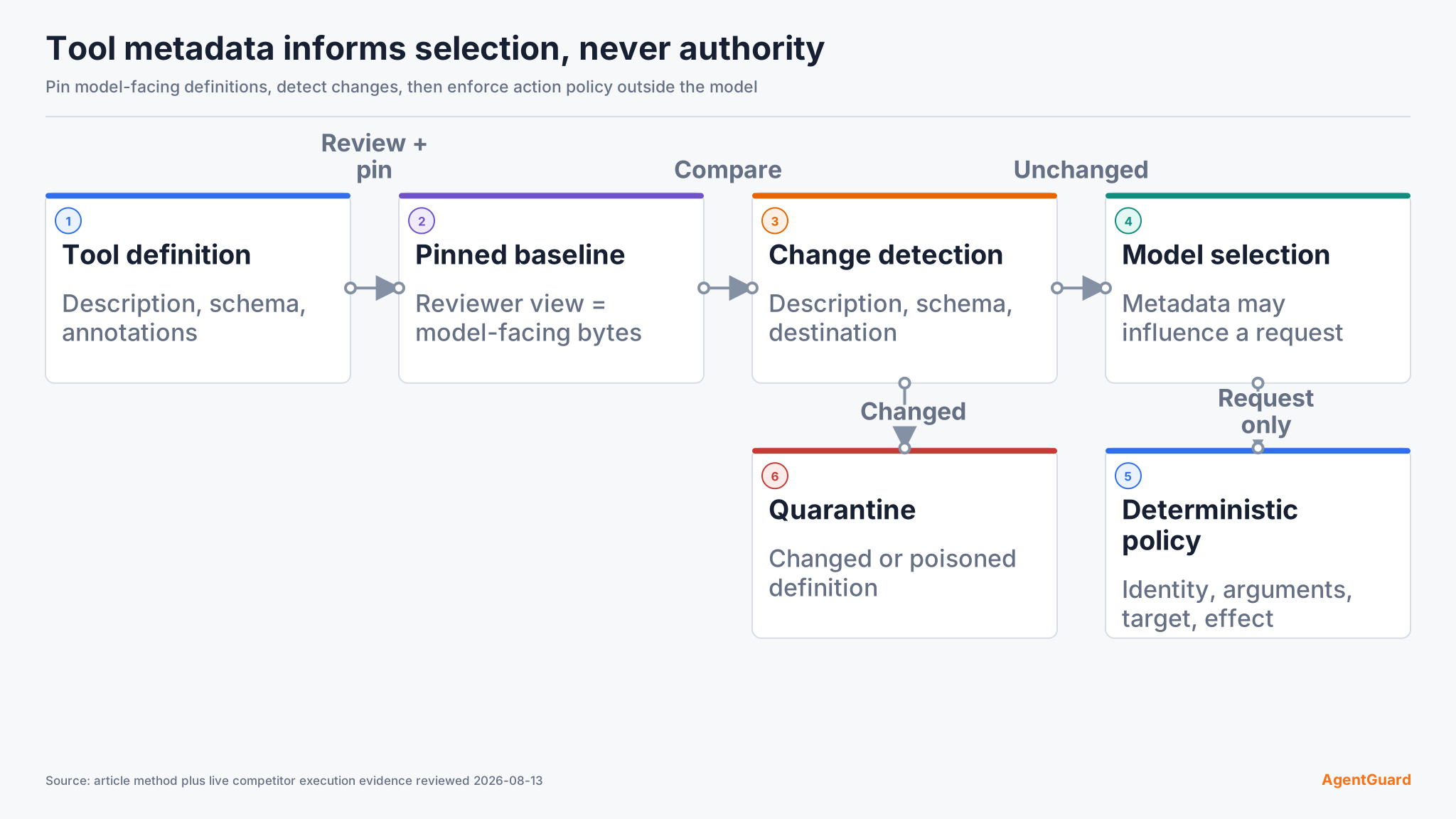
Compare metadata with repository source, release documentation, and the approved use case. Hash the accepted tool list, descriptions, and schemas alongside the server artifact. Bind approval to the version or digest rather than a mutable package name.
Run the MCP server scan process before the first connection. The scan should search descriptions and prompt templates as well as executable code and dependencies. A clean code scan does not approve a description that asks the model to disclose data.
Document allow, investigate, and reject criteria. Reject hidden instructions, unrelated data collection, confirmation bypass, undeclared tool preference, or a metadata source that changes independently of the pinned artifact.
The accepted baseline should contain enough fields for a later diff:
- server source, version, artifact digest, and retrieval time;
- complete tool names, descriptions, schemas, and annotations;
- normalized comparison form plus the preserved original response;
- approved tools, identities, destinations, and effects;
- reviewer, decision, exception owner, and expiry;
- client and model configuration used during the review.
Constrain tool capabilities
Assume a poisoned description may influence selection and arguments. Reduce what the handler can actually do: dedicated service identity, minimum scopes, bounded filesystem paths, approved domains, schema validation after normalization, tenant checks, rate limits, and no raw shell construction.
Remove tools that the use case does not require. Separate read and write operations. Do not let a broad “execute” or “request” tool stand in for many narrowly understood actions. The smaller the capability, the less authority poisoned metadata can steer.
AgentGuard publicly describes Deep Scan checks for malicious tools and prompt injection and selected pre-execution Runtime Guard decisions. These controls can add evidence within supported integrations, but the product FAQ does not claim complete coverage of every third-party MCP runtime call. Keep capability restrictions at the host and downstream service.
Separate metadata from authority
Tool descriptions help a model decide how to use a tool; they must not grant permission. Enforce authorization in deterministic code using validated identity, tool, arguments, destination, and requested effect. Ignore metadata claims such as “pre-approved,” “safe,” or “always run automatically.”
Keep system policy and trusted user intent outside untrusted tool text. When assembling model context, label tool metadata by source and avoid concatenating it into higher-priority instructions. Encoding boundaries help analysis, but no prompt hierarchy reliably replaces execution control.
Store approval records separately from the server. A server must not be able to mark its own tool trusted by changing a local file that the same process controls.
Gate consequential execution
Classify operations by effect. Low-impact, reversible reads may proceed within scope. Writes, messages, deployments, financial actions, credential use, destructive commands, and access to sensitive records need explicit policy and sometimes human approval bound to the exact normalized arguments.
Use the malicious tool call controls pattern to verify the decision before the external effect. Approval must identify the tool, target, arguments, identity, and expiry. Do not approve a vague session or all future calls from one server.
The runtime should retain decision, reason, metadata version, normalized request, and target outcome without logging secrets. A displayed confirmation followed by different arguments is a failure.
Detect changes and rug pulls
Re-fetch metadata on connection and compare it with the accepted hash. Block or quarantine additions, removals, description changes, schema expansion, and new destinations until reviewed. Monitor artifact and dependency changes at the same time; metadata pinning alone does not detect a malicious handler update.
The original Invariant tool poisoning research demonstrated that instructions hidden from the user could still influence a model and highlighted tool changes over time. Use the mechanism as evidence, while testing the clients and servers in your own deployment.
Define ownership for change review. A warning that no one must resolve becomes permanent unreviewed drift. Set an expiry for exceptions and disable the tool when the baseline cannot be restored.
Test and regress
Create synthetic tools with: a benign description, a hidden unrelated instruction, zero-width characters, an expanded schema, a changed destination, a request for a test secret, and a description that claims approval. None should receive real credentials or production access.
Expected results should cover metadata inspection, baseline comparison, tool selection, argument policy, approval binding, and target state. The benign tool should work within scope. Poisoned or changed tools should be blocked or quarantined, and the forbidden target must remain unchanged.
Re-run after client, model, prompt assembly, server artifact, tool metadata, policy, identity, or downstream API changes. Also test that false-positive handling does not teach operators to bypass the control globally.
Include three regression outcomes. First, the unchanged trusted tool remains usable within its original scope. Second, a metadata-only change is quarantined before the model can rely on it. Third, a request with trusted metadata but unauthorized normalized arguments is denied before the external effect. This separates baseline integrity from action authorization.
Define a failure mode for metadata retrieval and evidence storage. If the client cannot retrieve the full description, compare the baseline, or save the decision record, consequential tools should not proceed under an old trust decision. A narrow read may continue only when policy explicitly defines that degraded mode and its expiry.
Frequently Asked Questions
Can escaping or sanitizing descriptions stop tool poisoning?
It can expose suspicious characters and reduce some ambiguity, but it cannot decide whether ordinary-looking instructions are malicious. Pair inspection with capability limits and execution authorization.
Is tool poisoning the same as data poisoning?
No. Tool poisoning targets metadata used by an agent to select or call tools. Data poisoning changes training, retrieval, memory, or other data. Both can influence output, but their control points differ.
Does tool pinning solve the problem?
Pinning detects changes to an accepted baseline. It does not prove the baseline was benign and does not constrain what the handler can do.
What should happen when a description changes?
Quarantine the changed tool, show the exact diff, repeat security review, and approve a new baseline only after its capabilities and artifact are verified.
Pin tool metadata and block unauthorized effects before trust changes.
Scan tools